Real-Time Pod Rightsizing Software
Kubernetes Autoscaling: Best Practices for HPA, VPA, and KEDA
Chapter 3
Successfully deploying Kubernetes autoscaling in production involves more than enabling the Horizontal Pod Autoscaler (HPA) and a node provisioner. Maintaining cluster stability under variable load requires an understanding of the control loops that manage cluster state. For practical implementation, it is important to assess how:
- HPA calculates replica counts
- Stabilization windows prevent erratic scaling during brief traffic spikes, and
- Limits of the Vertical Pod Autoscaler (VPA), KEDA, and node autoscalers.
This guide examines each autoscaling component’s execution logic, including the HPA control loop, VPA update-mode tradeoffs, node provisioning constraints, and KEDA’s event-driven architecture. Since these systems often overlap, the guide also outlines how to resolve multi-layer conflicts by calibrating container-level resource requests.
Summary of key Kubernetes autoscaling best practices
| Best Practice | Explanation | Reason |
|---|---|---|
| Configure stabilization windows | Explicitly set behavior.scaleDown.stabilizationWindowSeconds (typically 300 seconds) |
Prevents rapid scale-up and scale-down cycles and maintains capacity during brief traffic drops. |
| Isolate VPA on horizontally scaled workloads | For workloads managed by HPA, run VPA in updateMode: "Off" mode to generate baseline recommendations without applying them. |
Prevents conflicts between controllers and avoids continuous cycles of pod termination caused by competing resource targets. |
| Clear node scale-down blockers |
|
Node autoscalers cannot remove underutilized nodes if eviction blockers exist, like local emptyDir storage or kube-system pods. |
| Scale to zero, but right-size the baseline |
|
For cost savings, so new pods are not overprovisioned at startup. |
| Fix pod requests before tuning autoscalers | HPA targets utilization based on requests, and Karpenter or Cluster Autoscaler schedules nodes accordingly. | Missing or inflated container CPU and memory requests cause autoscalers to make incorrect scaling decisions. |

-

Optimize workloads based on self-learning time-of-day patterns
-

Trust an automation controller w/ built-in workflow approvals & guardrails
-

Converse with an AI powered by specialized sub-agents & an MCP server


HPA internals and the control loop
When your cluster experiences a traffic spike, it may seem that the HPA immediately adds new pods. In fact, the HPA operates on a fixed-interval control loop. By default, the controller manager runs this loop every 15 seconds.
Understanding HPA control loop
In each cycle, the HPA queries the metrics API and calculates:
Required replica count = current utilization/target threshold.
This polling interval causes the HPA to react with a slight delay and doesn’t scale in real time.
To prevent instability, the HPA uses stabilization windows as historical buffers. Instead of acting on each calculation, the controller reviews recommendations over a set timeframe and selects the safest option, usually the highest replica count from that period.
For example, in the configuration below, if traffic drops briefly, the HPA waits five minutes (300 seconds) before scaling down. When removing pods, it terminates only 10% of total replicas per minute.
apiVersion: autoscaling/v2
kind: HorizontalPodAutoscaler
metadata:
  name: frontend-hpa
spec:
  scaleTargetRef:
    apiVersion: apps/v1
    kind: Deployment
    name: frontend-app
  minReplicas: 2
  maxReplicas: 10
  metrics:
  - type: Resource
    resource:
      name: cpu
      target:
        type: Utilization
        averageUtilization: 70
  behavior:
    scaleDown:
      stabilizationWindowSeconds: 300
      policies:
      - type: Percent
        value: 10
        periodSeconds: 60
Tuning the control loop
Setting the policies explicitly gives you control over how your cluster responds to volatile changes. However, tuning the control loop is effective only if you monitor the right signals.
Relying solely on CPU and memory utilization often doesn’t reflect actual performance. For example, if slow database queries limit your application, CPU usage may remain stable while request queues and latency increase. In this case, the HPA detects low resource utilization and does not scale, leaving your service under-provisioned.
Use custom or external metrics to scale if resource utilization doesn’t reflect actual load. For example, you can configure the HPA to monitor metrics like HTTP requests per second (RPS) or pending queue messages by integrating observability pipelines such as the Prometheus Adapter.
Using direct throughput metrics as scaling triggers ensures the control loop provisions capacity based on real user demand.
VPA mechanics and when it beats HPA
While the HPA scales out by adding more replicas, the VPA scales up by allocating more CPU and memory to existing pods. Rather than a single control loop, the VPA relies on three distinct components:
- Recommender
- Updater
- Admission Controller.
The Recommender monitors usage metrics to determine optimal resource requests. When adjustments are needed, the Updater terminates the pod, allowing the Admission Controller to apply new resource values during recreation.
Because eviction can disrupt active connections, Kubernetes 1.27 and later support in-place pod resizing. This enables the VPA to adjust CPU and memory on running containers without restarts, minimizing deployment disruption.
HPA vs. VPA auto scaling
VPA scaling is best for stateful/standalone workloads that can’t scale horizontally, while the HPA remains standard for stateless services.
| Workload Profile | Non-Horizontally Scalable (VPA) | Bursty and Stateless (HPA) |
|---|---|---|
| Target workloads | StatefulSets, legacy monoliths, single-instance databases, and batch processing jobs. | Web frontends, REST APIs, microservices, and queue processors. |
| Architecture | Cannot distribute state across replicas. Performance relies on raw compute per instance. | Ephemeral with fast startup times. Relies on load balancers to distribute traffic. |
| How does it work? | Modifies container CPU and memory requests to increase the resource requests per pod. | Adds or removes pod replicas without changing underlying container sizes. |
HPA/VPA scaling conflicts
Using the VPA in Auto mode with the HPA on a shared CPU or memory metric creates a continuous resize loop. Both controllers adjust the same metric: one changes container size, and the other changes pod count, wasting compute resources.
This conflict arises because the HPA calculates utilization as a percentage of the pod’s resource request. When traffic increases, the VPA detects high CPU usage and raises the pod’s CPU request to provide more headroom.
When the VPA increases the request, it lowers the utilization percentage. The HPA then scales down the replica count.
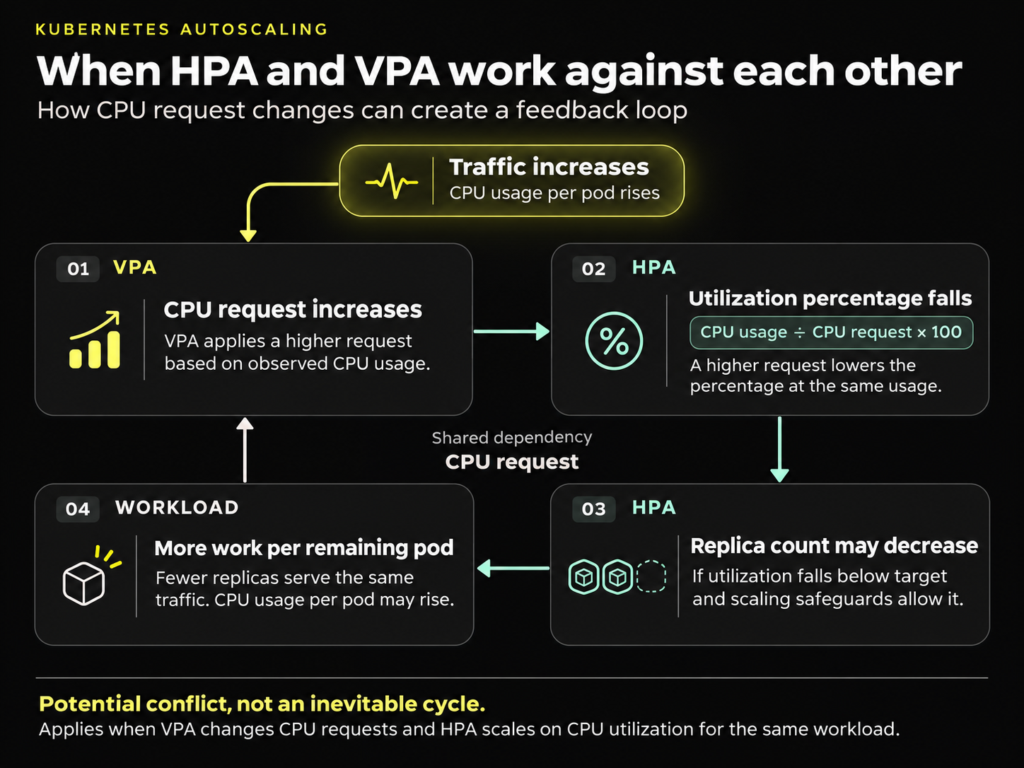
The HPA/VPA feedback loop: How simultaneous adjustments on the same metric cause continuous resizing & termination.
How Kubex can help
To safely adjust resources for horizontally scaled workloads, separate request updates from the HPA’s reconciliation loop. Kubex’s controlled automation offers this decoupled approach.
Kubex is an AI-driven resource optimization tool for K8S, GPUs & AI Workloads. Instead of letting the native VPA controller change requests at runtime and risk a feedback loop, Kubex Automated Pod Scaler analyzes historical utilization and applies corrected resource requests through staged deployment workflows. This approach enables you to adjust overprovisioned or underprovisioned base containers without affecting the HPA’s real-time scaling decisions.
Cluster Autoscaler and Karpenter provisioning limits
A common misconception in Kubernetes capacity management is that node autoscalers respond directly to hardware utilization. Many expect clusters to add nodes during CPU spikes or remove them when servers are idle.
In reality, node autoscalers do not monitor actual CPU or memory usage. Both Cluster Autoscaler and Karpenter provision capacity based solely on pending pod requests as signaled by the scheduler.
If the scheduler cannot find a node with enough available capacity for a new pod, the pod enters a Pending state. The autoscaler monitors these unschedulable pods, assesses their resource needs, and provisions a new node to accommodate them. Conversely, the autoscaler attempts to remove a node when its total requested resources drop below a defined threshold, typically 50%.
However, low resource requests do not guarantee scale-down. Node autoscalers are constrained by eviction rules designed to prevent data loss and application downtime.
Scale down limitations
Even if a node is idle, the autoscaler will not terminate it if eviction blockers exist. The primary blockers are:
- Restrictive PodDisruptionBudgets: A PDB set to
maxUnavailable: 0explicitly forbids evicting the protected pods. - Pods without owner references: A pod created without a parent controller (such as a Deployment or Job) will not be recreated if it is terminated.
- Local storage dependencies: Pods utilizing emptyDir volumes block node removal by default to prevent the loss of ephemeral data.
- System pods: Pods in the kube-system namespace block scale-down unless explicitly configured to allow safe eviction.
Because node autoscalers rely solely on requests defined in manifests, inaccurate configurations can waste infrastructure. Inflated container requests reserve unused capacity, leading the autoscaler to provision unnecessary nodes.
How Kubex can help
To fix node provisioning, the provisioner must receive accurate input data. Solutions like Kubex Node Optimizer address this by continuously calibrating baseline container requests using historical usage data.
For example, the dashboard below shows the allocatable CPU and memory, requested CPU and memory, and actual utilization as three lines on a single time series.
Allocatablerepresents the resources provisioned by KarpenterRequestedindicates the resources reserved by the schedulerUtilizedreflects the resources consumed by the pods
The brown band between requested and utilized represents idle reservations
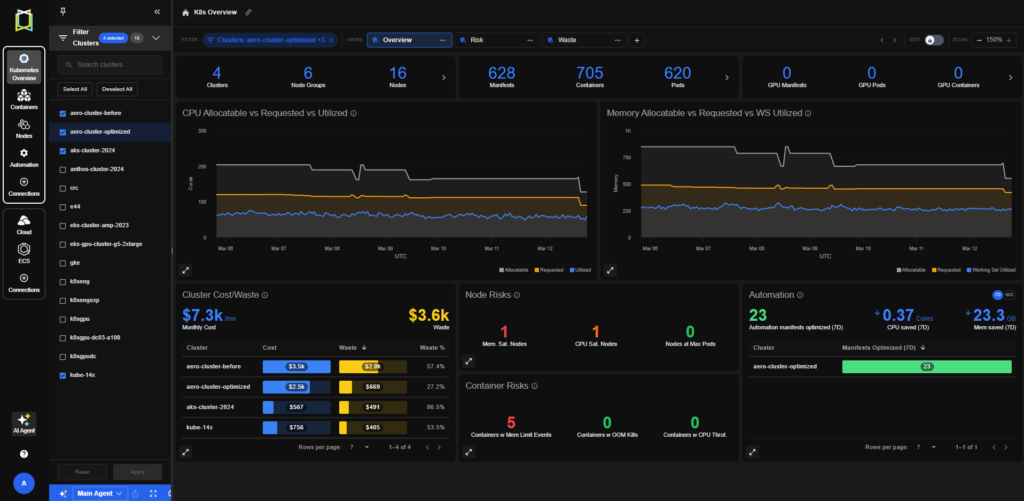
Kubex dashboard of allocatable, requested, and utilized capacity for Kubernetes autoscaling
By ensuring each pod requests only the compute it needs, Kubex enables Cluster Autoscaler and Karpenter to provision infrastructure based on accurate, right-sized signals.
KEDA and event-driven scaling
Standard HPA configurations rely on core metrics or complex custom metric pipelines. KEDA (Kubernetes Event-driven Autoscaling) extends the control plane with external scalers. It lets workloads scale based on external signals, such as pending requests in a queue, message backlogs, or database query results that HPA cannot directly capture.
A common misconception is that KEDA replaces HPA. In practice, KEDA acts as a metrics provider that complements the native system.
How KEDA works
When deployed, KEDA creates and manages a standard HPA object.
The ScaledObject manifest below demonstrates how KEDA connects an external queue to a Deployment:
apiVersion: keda.sh/v1alpha1
kind: ScaledObject
metadata:
  name: queue-processor-scaler
spec:
  scaleTargetRef:
    name: queue-processor
  minReplicaCount: 0
  maxReplicaCount: 50
  triggers:
  - type: aws-sqs-queue
    metadata:
      queueURL: "https://sqs.us-east-1.amazonaws.com/123456789012/my-queue"
      queueLength: "10"
In this example, KEDA enables scale-to-zero by managing the activation from 0 to 1. When messages arrive in the my-queue SQS queue, KEDA scales the Deployment from 0 to 1 pod. Once a pod is running, KEDA’s metrics adapter exposes the queue length as an external metric. The HPA KEDA creates uses this metric to determine the desired replica count, targeting 10 messages per pod. KEDA also manages cooldown and any scaling policies defined on the ScaledObject.
KEDA limitations
KEDA manages timing and triggers for horizontal scaling but does not control container-level resource requests, creating a gap at the hardware allocation layer. For example, if a pod requests 2 CPU cores but needs only 0.5 cores per message, KEDA will scale replicas based on pending requests and propagate the overprovisioned configuration to each new replica.
This behavior can waste infrastructure resources during high-throughput bursts. Since KEDA only controls pod count, resource requests must be adjusted separately.
How Kubex can help
Kubex can be used to calibrate baseline container requests. This ensures pods are sized correctly when KEDA triggers scaling, preventing the Cluster Autoscaler from provisioning unnecessary node capacity.
Summarising multi-layer anti-patterns and how to avoid them
Stacking Kubernetes autoscalers without defined limits can result in cascading failures. Since these controllers operate independently, a misconfiguration at the pod level may quickly cause infrastructure waste at the node level.
Controller conflict on shared metrics
A common anti-pattern is deploying both the HPA and VPA in Auto mode on the same workload metric. This creates a feedback loop: as the VPA increases container requests, the HPA’s utilization percentage drops, triggering a scale-down. The controllers then compete for the same resource, causing pod terminations and reduced application performance.
To prevent this, run the VPA in Off (recommendation-only) mode to separate request updates from the active runtime environment.
Node underutilization and stranded capacity
Another anti-pattern occurs at the node provisioning layer due to persistent request inflation. Since the Cluster Autoscaler and Karpenter schedule based solely on requested resources, oversized pods force the provisioner to launch new nodes even when existing nodes are nearly idle. This prevents effective bin-packing, resulting in excess node capacity and higher infrastructure costs.
Prevent this by implementing a continuous rightsizing pipeline to reduce inflated base requests before they reach the scheduler.
For example, use solutions like Predictive Pod Scaler to calibrate requests against historical data, mutating admission webhooks to adjust configurations at deployment, or GitOps workflows that convert VPA recommendations into automated pull requests.
Rolling-update edge case
A subtler anti-pattern occurs during deployments because of how the HPA handles pod states. By default, the HPA excludes NotReady pods from its utilization calculation. If a rolling update deploys new replicas that need time to pass readiness probes, the HPA calculates utilization only for the remaining Ready pods.
If these active pods handle peak traffic, their utilization percentage increases. The HPA then triggers a premature scale-out, adding more pods to the NotReady pipeline. If these pods also have oversized baseline requests, this forces the Cluster Autoscaler or Karpenter to provision unnecessary nodes for the pending queue.
Prevent this by tuning readiness-probe timeouts and right-sizing baseline requests so temporary traffic spikes don’t distort utilization calculations.
Conclusion
To achieve stable, cost-effective Kubernetes autoscaling, the HPA, VPA, and node provisioners must work as an integrated system. Otherwise, uncoordinated scaling causes application instability and wasted node resources.
The autoscaling stack’s efficiency depends on one key factor: container resource requests. Instead of manually adjusting these settings and risking controller conflicts, use automated solutions like Kubex to continuously right-size your workloads.
Kubex dynamically calibrates container requests using historical metrics before scheduling. This ensures each layer of your scaling stack operates with accurate data. The approach also eliminates stranded capacity and ensures your Kubernetes cluster scales predictably with actual production demand.

Try us
Experience automated K8s, GPU & AI workload resource optimization in action.
Try us
Experience automated K8s, GPU & AI workload resource optimization in action.
 Guide
 Video