
 Guide to Kubernetes Tools
 Kustomize Tutorial
Chapter 7
- Introduction: 25 Essential Kubernetes Tools for Container Management
- Chapter 1: Managing Kubernetes Resource Limits
- Chapter 2: Use Terraform to Provision AWS EKS. Learn Why & How.
- Chapter 3: EKS vs GKE vs AKS: An In-Depth Comparison
- Chapter 4: The Guide to Helm & EKS
- Chapter 5: Kubernetes kOps
- Chapter 6: Kubernetes Best Practices
- Chapter 7: Kustomize Tutorial
- Chapter 8: How to Deploy a K8s Cluster Using Kubespray
- Chapter 9: Guide To Kube-State-Metrics
- Chapter 10: Kubeadm Tutorial
What is Kustomize?
Kustomize is a configuration management solution that leverages layering to preserve the base settings of your applications and components by overlaying declarative yaml artifacts (called patches) that selectively override default settings without actually changing the original files.
This approach to configuration management is incredibly powerful because most organizations rely on a combination of internally created (which Kustomize supports with bespoke) and common off-the-shelf (which Kustomize supports with COTS) applications to build their products. Overly customizing your source configuration files to satisfy individual use cases not only dramatically minimizes their reusability, it also makes ingesting upgrades either impossible or incredibly painful.
With Kustomize, your team can ingest any base file updates for your underlying components while keeping use-case specific customization overrides intact. Another benefit of utilizing patch overlays is that they add dimensionality to your configuration settings, which can be isolated for troubleshooting misconfigurations or layered to create a framework of most-broad to most-specific configuration specifications.
To recap, Kustomize relies on the following system of configuration management layering to achieve reusability:
- Base Layer: Specifies the most common resources
- Patch Layers: Specifies use case-specific resources
Some Real-world Context
Let’s say that you are using a Helm chart from a particular vendor. It’s a close fit for your use case, but not perfect, and requires some customizations. So you fork the Helm chart, make your configuration changes, and apply it to your cluster. A few months later, your vendor releases a new version of the chart you’re using that includes some important features you need. In order to leverage those new features, you have to fork the new Helm chart and re-apply your configuration changes.
At scale, re-forking and re-customizing these Helm charts become a large source of overhead with an increased risk of misconfigurations, threatening the stability of your product and services.
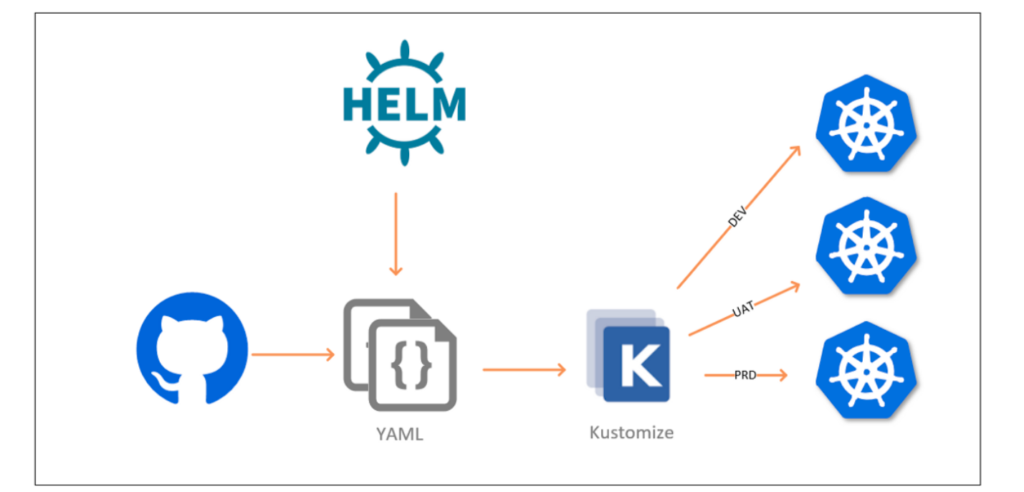
Kustomize works with Git and Helm to make the continuous delivery pipeline easier to configure.
The above diagram shows a common use case of a continuous delivery pipeline that starts with a git event. The event may be a push, merge or create a new branch. In this case, Helm is used for generating the YAML files and Kustomize will patch it with environment-specific values based on the events. For example: if the branch is master and tied to the production environment, then kustomize will apply the values applicable to production.
Kustomize Features
Kustomize is often used in conjunction with Helm as described above, and it’s been embedded in Kubernetes since its March 2019 release of version 1.14 (invoked by the command apply -k).
Kustomize offers the following valuable attributes:
- Kubectl Native: No need to install or manage as a separate dependency
- Plain Yaml: No complex templating language
- Declarative: Purely declarative (just like Kubectl)
- Multiple Configurations: Manages any number of different configurations
Before we dive into Kustomize’s features, let’s compare Kustomize to native Helm and native Kubectl to better highlight the differentiated functionality that it offers.
| Kustomize | Native Helm | Native Kubectl |
|---|---|---|
| No templating | Complex templating | No templating |
| No separate setup | Needs setup | No separate setup |
| Manage multiple configurations with one base file | Manage multiple configurations with one base file | Should have separate files for each different configuration |
| Easy learning curve | Takes more as compared to the other two. | Easy learning curve |
Spend less time optimizing Kubernetes Resources. Rely on AI-powered Kubex - an automated Kubernetes optimization platform
Free 30-day TrialBenefits of Using Kustomize
1. Reusability
Kustomize allows you to reuse one base file across all of your environments (development, staging, production) and then overlay unique specifications for each.
2. Fast Generation
Since Kustomize has no templating language, you can use standard YAML to quickly declare your configurations.
3. Easier to Debug
YAML itself is easy to understand and debug when things go wrong. Pair that with the fact that your configurations are isolated in patches, and you’ll be able to triangulate the root cause of performance issues in no time. Simply compare performance to your base configuration and any other variations that are running.
Kubernetes Example
Let’s step through how Kustomize works using a deployment scenario involving 3 different environments: dev, staging, and production. In this example, we’ll use service, deployment, and horizontal pod autoscaler resources. For the dev and staging environments, there won’t be any HPA involved. All of the environments will use different types of services:
- Dev: ClusterIP
- Staging: NodePort
- Production: LoadBalancer
They each will have different HPA settings. This is how directory structure looks:
├── base

│   ├── deployment.yaml

│   ├── hpa.yaml

│   ├── kustomization.yaml

│   └── service.yaml

└── overlays

    ├── dev

    │   ├── hpa.yaml

    │   └── kustomization.yaml

    ├── production

    │   ├── hpa.yaml

    │   ├── kustomization.yaml

    │   ├── rollout-replica.yaml

    │   └── service-loadbalancer.yaml

    └── staging

        ├── hpa.yaml

        ├── kustomization.yaml

        └── service-nodeport.yaml
1. Review Base Files
The base folder holds the common resources, such as the standard deployment.yaml, service.yaml, and hpa.yaml resource configuration files. We’ll explore each of their contents in the following sections.
base/deployment.yaml
apiVersion: apps/v1

kind: Deployment

metadata:

  name: frontend-deployment

spec:

  selector:

matchLabels:

   app: frontend-deployment

  template:

metadata:

   labels:

     app: frontend-deployment

spec:

   containers:

   - name: app

     image: foo/bar:latest

     ports:

     - name: http

       containerPort: 8080

       protocol: TCP
base/service.yaml
apiVersion: v1

kind: Service

metadata:

  name: frontend-service

spec:

  ports:

- name: http

   port: 8080

  selector:

   app: frontend-deployment
base/hpa.yaml
apiVersion: autoscaling/v2

kind: HorizontalPodAutoscaler

metadata:

  name: frontend-deployment-hpa

spec:

  scaleTargetRef:

apiVersion: apps/v1

kind: Deployment

name: frontend-deployment

  minReplicas: 1

  maxReplicas: 5

  metrics:

  - type: Resource

resource:

   name: cpu

   target:

     type: Utilization

     averageUtilization: 50
base/kustomization.yaml
The kustmization.yaml file is the most important file in the base folder and it describes what resources you use.
apiVersion: kustomize.config.k8s.io/v1beta1

kind: Kustomization


resources:

  - service.yaml

  - deployment.yaml

  - hpa.yaml
Spend less time optimizing Kubernetes Resources. Rely on AI-powered Kubex - an automated Kubernetes optimization platform
Free 30-day Trial2. Define Dev Overlay Files
The overlays folder houses environment-specific overlays. It has 3 sub-folders (one for each environment).
dev/kustomization.yaml
This file defines which base configuration to reference and patch using patchesStrategicMerge, which allows partial YAML files to be defined and overlaid on top of the base.
apiVersion: kustomize.config.k8s.io/v1beta1

kind: Kustomization

resources:

- ../../base

patches:

- hpa.yaml
dev/hpa.yaml
This file has the same resource name as the one located in the base file. This helps in matching the file for patching. This file also contains important values, such as min/max replicas, for the dev environment.
apiVersion: autoscaling/v2

kind: HorizontalPodAutoscaler

metadata:

  name: frontend-deployment-hpa

spec:

  minReplicas: 1

  maxReplicas: 2

  metrics:

  - type: Resource

resource:

   name: cpu

   target:

     type: Utilization

     averageUtilization: 90
If you compare the previous hpa.yaml file with base/hpa.yaml, you’ll notice differences in minReplicas, maxReplicas, and averageUtilization values.
3. Review Patches
To confirm that your patch config file changes are correct before applying to the cluster, you can run the following:
`kustomize build overlays/dev`
apiVersion: v1
kind: Service
metadata:
  name: frontend-service
spec:
  ports:
  - name: http
    port: 8080
  selector:
    app: frontend-deployment
---
apiVersion: apps/v1
kind: Deployment
metadata:
  name: frontend-deployment
spec:
  selector:
    matchLabels:
      app: frontend-deployment
  template:
    metadata:
      labels:
        app: frontend-deployment
    spec:
      containers:
      - image: foo/bar:latest
        name: app
        ports:
        - containerPort: 8080
          name: http
          protocol: TCP
---
apiVersion: autoscaling/v2
kind: HorizontalPodAutoscaler
metadata:
  name: frontend-deployment-hpa
spec:
  maxReplicas: 2
  metrics:
  - resource:
      name: cpu
      target:
        averageUtilization: 90
        type: Utilization
    type: Resource
  minReplicas: 1
  scaleTargetRef:
    apiVersion: apps/v1
    kind: Deployment
4. Apply Patches
Once you have confirmed that your overlays are correct, use the following command to apply the the settings to your cluster:
`kubectl apply -k overlays/dev`
> kubectl apply -k  overlays/dev
service/frontend-service created
deployment.apps/frontend-deployment created
horizontalpodautoscaler.autoscaling/frontend-deployment-hpa created
After handling the dev environment, we will demo the production environment as in our case it’s superset if staging(in terms of k8s resources).
Spend less time optimizing Kubernetes Resources. Rely on AI-powered Kubex - an automated Kubernetes optimization platform
Free 30-day Trial5. Define Prod Overlay Files
prod/hpa.yaml
In our production hpa.yaml, let’s say we want to allow up to 10 replicas, with new replicas triggered by a resource utilization threshold of 70% avg CPU usage. This is how that would look:
apiVersion: autoscaling/v2

kind: HorizontalPodAutoscaler

metadata:

  name: frontend-deployment-hpa

spec:

  minReplicas: 1

  maxReplicas: 10

  metrics:

  - type: Resource

resource:

   name: cpu

   target:

     type: Utilization

     averageUtilization: 70
prod/rollout-replicas.yaml
There’s also a `rollout-replicas.yaml` file in our production directory which specifies our rolling strategy:
apiVersion: apps/v1
kind: Deployment
metadata:
  name: frontend-deployment
spec:
  replicas: 10
  strategy:
	rollingUpdate:
  	maxSurge: 1
  	maxUnavailable: 1
	type: RollingUpdate
prod/service-loadbalancer.yaml
We use this file to change the service type to LoadBalancer (whereas in `staging/service-nodeport.yaml`, it is being patched as NodePort).
apiVersion: v1
kind: Service
metadata:
  name: frontend-service
spec:
  type: LoadBalancer
prod/kustomization.yaml
This file operates the same way in the production folder as it does in your base folder: it defines which base file to reference and which patches to apply for your production environment. In this case, it includes two more files: rollout-replica.yaml and service-loadbalancer.yaml.
apiVersion: kustomize.config.k8s.io/v1beta1
kind: Kustomization
resources:
- ../../base
patches:
- rollout-replica.yaml
- hpa.yaml
- service-loadbalancer.yaml
6. Review Prod Patches
Lets see if production values are being applied by running the following:
`kustomize build overlays/production`
Once you have reviewed, apply your overlays to the cluster:
`kubectl apply -k overlays/production`
> kubectl apply -k overlays/production
service/frontend-service created
deployment.apps/frontend-deployment created
horizontalpodautoscaler.autoscaling/frontend-deployment-hpa created
Spend less time optimizing Kubernetes Resources. Rely on AI-powered Kubex - an automated Kubernetes optimization platform
Free 30-day TrialKustomize Best Practices
- Keep your custom resources and their instances in separate packages, otherwise, you will encounter race conditions and your creation will get stuck. For example, many people keep both the CertManager CRD and CertManager’s resources in the same package, which can cause problems. Most of the time, reapplying the YAML fixes the issue. But it’s good practice to keep them separately.
- Try to keep the common values like namespace, common metadata in the base file.
- Organize your resources by kind, using the following naming convention: lowercase-hypenated.yaml (e.g., horizontal-pod-autoscaler.yaml). Place services in the service.yaml file.
- Follow standard directory structure, using `bases/` for base files and `patches/` or `overlays/` for environment specific files.
Install Kustomize
Kustomize has shipped bundled with kubectl since version 1.14 (March 2019), so any modern kubectl install already includes it
For a stand-alone Kustomize installation(aka Kustomize cli) , use the following to set it up.
- Run the following:
curl -s "https://raw.githubusercontent.com/\
kubernetes-sigs/kustomize/master/hack/install_kustomize.sh" | bash - Move Kustomize to your path, so that it can be accessed system-wide:
`sudo mv kustomize /usr/local/bin` - Open a new terminal and run
`kustomize -h` to verify.
> kustomize -h

Manages declarative configuration of Kubernetes.
See https://sigs.k8s.io/kustomize

Usage:
  kustomize [command]

Available Commands:
  build                     Build a kustomization target from a directory or URL.
  cfg                       Commands for reading and writing configuration.
  completion                Generate shell completion script
  create                    Create a new kustomization in the current directory
  edit                      Edits a kustomization file
  fn                        Commands for running functions against configuration.
  help                      Help about any command
  version                   Prints the kustomize version

Flags:
  -h, --help          help for kustomize
      --stack-trace   print a stack-trace on error

Additional help topics:
  kustomize docs-fn                   [Alpha] Documentation for developing and invoking Configuration Functions.
  kustomize docs-fn-spec              [Alpha] Documentation for Configuration Functions Specification.
  kustomize docs-io-annotations       [Alpha] Documentation for annotations used by io.
  kustomize docs-merge                [Alpha] Documentation for merging Resources (2-way merge).
  kustomize docs-merge3               [Alpha] Documentation for merging Resources (3-way merge).
  kustomize tutorials-command-basics  [Alpha] Tutorials for using basic config commands.
  kustomize tutorials-function-basics [Alpha] Tutorials for using functions.

Use "kustomize [command] --help" for more information about a command.
For more installation options, see kubectl documentation.

Try us
Experience automated K8s, GPU & AI workload resource optimization in action.
Try us
Experience automated K8s, GPU & AI workload resource optimization in action.

 Video
Video 
 Guide
Guide 
 Paper
Paper 

