
 Guide to Kubernetes Tools
 How to Deploy a K8s Cluster Using Kubespray
Chapter 8
- Introduction: 25 Essential Kubernetes Tools for Container Management
- Chapter 1: Managing Kubernetes Resource Limits
- Chapter 2: Use Terraform to Provision AWS EKS. Learn Why & How.
- Chapter 3: EKS vs GKE vs AKS: An In-Depth Comparison
- Chapter 4: The Guide to Helm & EKS
- Chapter 5: Kubernetes kOps
- Chapter 6: Kubernetes Best Practices
- Chapter 7: Kustomize Tutorial
- Chapter 8: How to Deploy a K8s Cluster Using Kubespray
- Chapter 9: Guide To Kube-State-Metrics
- Chapter 10: Kubeadm Tutorial
Updated September 11, 2026.
Kubespray is a powerful open source tool for deploying and managing Kubernetes clusters that provides a balance of implementation flexibility and ease of use. The tool works with public cloud, on-premises, bare-metal, and test environment solutions, making it ideal for managing highly available clusters across multiple different platforms.
Ideal uses for Kubespray include:
- Deploying production-grade Kubernetes clusters in on-prem and bare-metal environments that lack sophisticated managed solutions such as GKE, EKS, or AKS.
- Deploying production-grade Kubernetes clusters in cloud environments without losing control over Kubernetes control plane components to a managed cloud provider.
In this article, we’ll take a look at how Kubespray works before walking through the shape of a typical deployment, with pointers to the Kubespray documentation throughout for the specifics of each step.
How does Kubespray Work?
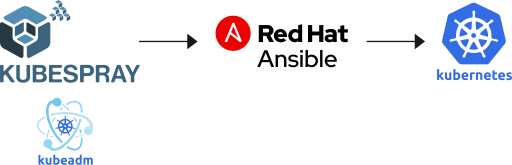
Kubespray uses a combination of Ansible and kubeadm to deploy a Kubernetes cluster.
Ansible is an open source automation tool that configures servers by connecting to them over SSH and running a series of declared tasks, grouped into reusable units called playbooks and roles. There’s no agent to install on the target machines, and the same playbook can be run again safely to bring a cluster back in line with its intended configuration. Kubespray is, at its core, a large and well-tested collection of Ansible roles purpose-built for standing up Kubernetes.
Kubeadm is the official Kubernetes tool for bootstrapping a cluster: it initializes the control plane, joins worker nodes, and handles the low-level mechanics of certificates, tokens, and cluster configuration. Ansible orchestrates the servers; kubeadm does the actual work of turning them into a Kubernetes cluster. Kubespray wraps kubeadm in Ansible automation so you get a repeatable, hands-off deployment instead of running kubeadm commands by hand on every node.
Kubespray is also highly composable, offering a choice of:
- Kubernetes and core component versions (etcd, container runtimes such as containerd, cri-o, and Docker)
- Linux distributions (Debian, Ubuntu, RHEL/CentOS Stream, Fedora, openSUSE, Rocky Linux, and others)
- Container network interface (CNI) plugins (Calico, Cilium, Flannel, Kube-OVN, Kube-router, Multus, and more)
- Optional add-ons such as cert-manager, MetalLB, and CoreDNS
That breadth of choice matters more than it might first appear. Most managed Kubernetes offerings lock you into a specific OS image, a house-brand networking layer, and a release cadence set by the provider.
Kubespray’s approach lets you match the cluster to your environment — running the Linux distribution your security team has already hardened and patched, choosing a CNI that supports the network policies or performance profile your workloads actually need (BGP peering, encryption, eBPF-based dataplanes, and so on), pinning to a Kubernetes version that matches what the rest of your fleet is running, and adding only the ingress, certificate management, or DNS components your platform requires rather than a fixed bundle. For organizations running the same Kubernetes clusters across multiple clouds, bare-metal data centres, and on-prem racks, that flexibility is often the deciding factor over a single-cloud managed service.
For the current set of supported options, see:
- Supported Linux distributions
- Supported components
- Network plugins
- Release notes, which list the exact component versions each release ships with
Before using Kubespray, we recommend becoming familiar with Ansible constructs like playbooks and inventory, since Kubespray is built entirely on top of them.
Prerequisites
Kubespray’s baseline requirements (minimum supported Kubernetes version, Ansible version, Python dependencies, and hardware sizing) are maintained in the Requirements section of the project README, along with kernel requirements for older distributions.
If you plan to provision infrastructure on a specific cloud, check that provider’s setup notes before you begin — for example, AWS, Azure, OpenStack, or vSphere.
Spend less time optimizing Kubernetes Resources. Rely on AI-powered Kubex - an automated Kubernetes optimization platform
Free 30-day TrialDeployment Workflow
At a high level, deploying a cluster with Kubespray follows the same four stages regardless of which release you’re on. Each stage links to the relevant doc for the exact commands and options.
1. Get Kubespray running
Kubespray can be run three ways: from a prebuilt Docker image, as a standard Ansible checkout with its Python dependencies installed, or via Vagrant for local testing. Pick whichever fits your workflow and follow the corresponding quick start in the Kubespray README.
For a guided walkthrough of setting up your working environment and inventory, see Getting started and Setting up your first cluster.
2. Provision infrastructure
Infrastructure topology should be based on organizational needs (for example, the number of control plane and worker nodes, firewall rules, and subnet CIDR ranges). Kubespray ships sample Terraform configurations for several providers under contrib/terraform, including AWS, Azure, GCP, OpenStack, and UpCloud. These are a starting point rather than a fixed prescription — review the variables file for the provider you’re using before you apply it.
Once your nodes exist, you’ll generate an Ansible inventory describing them. The Ansible inventory and tags doc covers inventory formats, host groups (control plane, etcd, and worker nodes), and the tags you can use to target specific parts of the playbook.
3. Deploy your Kubernetes cluster
With infrastructure provisioned and an inventory in hand, you run Kubespray’s main cluster playbook against your inventory. The Deployment data variables doc lists every variable you can set to customize the deployment — network plugin, container runtime, Kubernetes version, and so on — before you kick off the playbook run.
4. Access your Kubernetes cluster
Once the playbook completes, Kubespray will have generated a kubeconfig file on your control plane nodes. How you retrieve and use it (directly, through a bastion host, or via a load balancer) depends on your infrastructure topology; the HA mode doc explains how Kubespray handles control plane access in highly available setups.
Spend less time optimizing Kubernetes Resources. Rely on AI-powered Kubex - an automated Kubernetes optimization platform
Free 30-day TrialCommon Cluster Operations
Kubespray ships dedicated playbooks for the day-two operations you’ll run most often. Here’s what each operation covers, and where to read up on the specifics:
- Removing a node from the cluster
- Adding a node back, or scaling the cluster with new nodes
- Checking the running Kubernetes version
- Upgrading the cluster to a newer Kubernetes version
- Tearing down infrastructure you provisioned for testing
The Adding/replacing a node doc covers node addition and removal, and the Upgrades basics doc covers version upgrades. If you’re managing a large cluster, also see Large deployments for tuning guidance. To remove infrastructure you provisioned via Terraform, run a `terraform destroy` against the same variables file you used to provision it.
Upgrading Kubespray itself
Kubespray does not support or recommend skipping release versions when upgrading. If you are several releases behind, you generally need to step through each intermediate release rather than jumping straight to the latest one. The Upgrades basics doc and the release notes for each version in between are the best source of truth for what’s changed and what action, if any, is required before you upgrade — recent releases have included breaking changes (removed variables, renamed roles, deprecated add-ons) that are called out explicitly under “Urgent Upgrade Notes” in each release.
Spend less time optimizing Kubernetes Resources. Rely on AI-powered Kubex - an automated Kubernetes optimization platform
Free 30-day TrialConclusion
While there are many Kubernetes tools available today, few offer the same level of platform flexibility provided by Kubespray. Kubespray is a great solution for organizations that are already familiar with or are actively using Ansible for their existing provisioning and orchestration. In addition, Kubespray’s composability means that your team gets to choose the tech (applications, Kubernetes runtime, Linux distribution, network plugins, and so on) that you already know and trust. If your organization anticipates needing a multi-platform strategy (across cloud, bare-metal, on-prem, and others) and has already adopted Ansible, then Kubespray is an ideal choice for deploying your Kubernetes clusters.
For anything version-specific — supported Kubernetes releases, component versions, configuration variables, or command syntax — treat the Kubespray documentation and release notes as the source of truth, and check back there before every deployment.
FAQs
What is Kubespray?
Kubespray is an open-source tool that uses Ansible and kubeadm to deploy and manage Kubernetes clusters. It supports cloud, bare-metal, and on-premises environments, offering flexibility for multi-platform deployments.
Why use Kubespray instead of managed Kubernetes services?
Kubespray is ideal for organizations that want full control over the Kubernetes control plane. Unlike managed services such as EKS, AKS, or GKE, Kubespray lets you customize networking, operating systems, and container runtimes.
What platforms does Kubespray support?
Kubespray works across AWS, GCP, Azure, OpenStack, vSphere, bare-metal servers, and on-premises environments. It’s especially useful for hybrid or multi-cloud Kubernetes strategies. See the supported Linux distributions list for the current set of operating systems.
How do you deploy a cluster with Kubespray?
You provision infrastructure with a tool such as Terraform, generate an Ansible inventory describing your nodes, and run the Ansible playbooks provided by Kubespray. This installs and configures Kubernetes components across your nodes. See Getting started for the full walkthrough.
What are best practices for upgrading with Kubespray?
Kubespray upgrades must follow sequential versions — skipping releases is not supported. Always test upgrades in staging, back up cluster data, and read the “Urgent Upgrade Notes” section of each release’s changelog for breaking changes before you apply an upgrade in production.

Try us
Experience automated K8s, GPU & AI workload resource optimization in action.
Try us
Experience automated K8s, GPU & AI workload resource optimization in action.

 Video
Video 
 Guide
Guide