 Guide to OpenShift Tutorial
 Rancher vs. Openshift: The Guide
Chapter 7
- Introduction: OpenShift Tutorial
- Chapter 1: OpenShift Architecture
- Chapter 2: OpenShift Route
- Chapter 3: Openshift Alternatives
- Chapter 4: OpenShift Service Mesh
- Chapter 5: Understanding OpenShift Container Storage
- Chapter 6: Using Azure OpenShift
- Chapter 7: Rancher vs. Openshift: The Guide
- Chapter 8: OpenShift Serverless: Guide & Tutorial
- Chapter 9: Anti-Affinity OpenShift: Tutorial & Instructions
- Chapter 10: OpenShift Operators: Tutorial & Instructions
Updated September 11, 2026.
Kubernetes is the leader in the container orchestration space and addresses many challenges related to scaling containerized workloads. However, at scale, Kubernetes cluster management can create challenges and complexities of its own.
Today, several platforms address the challenges of Kubernetes management. SUSE’s Rancher and Red Hat’s OpenShift Container Platform (OCP) are two of the most popular.
Rancher and OpenShift both make Kubernetes clusters easier to manage, but each platform has some notable differences. There’s no one-size-fits-all solution, and the right solution depends on an organization’s use case.
In this article, we’ll take a closer look at Rancher vs. OpenShift, the similarities and differences between the platforms, and provide guidance on which platform makes the most sense for specific use cases.
What is Rancher?
Rancher Labs was founded in 2014. SUSE acquired Rancher in 2020 to bring Kubernetes into their portfolio. Rancher has three key products that integrate into the Kubernetes space:
- Rancher, a cluster manager (available as open source Rancher or the commercially supported SUSE Rancher Prime)
- RKE2, a security-focused Kubernetes distribution
- K3s, a lightweight version of Kubernetes
The Rancher platform is a multi-cluster manager for Kubernetes. Rancher can manage clusters installed on-premise or in the cloud, providing a centralized management console. Rancher can also import previously deployed Kubernetes clusters not initially deployed with Rancher.
One of the most significant points about Rancher is that it can manage multiple Kubernetes clusters in various locations regardless of whether or not they are created with Rancher. So if you already have a Kubernetes cluster, you can import it into Rancher and begin to manage it from Rancher’s interface.
This is an excellent option for those already using Kubernetes, as Rancher itself is not a Kubernetes distribution but instead a management tool.
RKE2 and K3s are both Kubernetes distributions developed by Rancher, aimed at different ends of the same problem. RKE2 is built for security and compliance: it ships with defaults that meet the CIS Kubernetes Benchmark with minimal tuning, supports FIPS 140 compliance, and runs its control plane components as static pods managed by the kubelet with an embedded containerd runtime — no separate container engine required. K3s is a certified, lightweight Kubernetes distribution packaged as a single small binary, purpose-built for edge, IoT, and resource-constrained environments, and it can also run production workloads.
What is OpenShift?
Red Hat’s OpenShift Container Platform is their product in the Kubernetes container orchestration space. OpenShift is a distribution of Kubernetes that adds on additional developer tooling, integrated registry management, and stricter security policies by default. Red Hat refers to this as an opinionated way of running Kubernetes.
Certified add-ons are discoverable from inside the cluster through OperatorHub, and more broadly through the Red Hat Ecosystem Catalog. Sourcing add-ons this way instills more confidence that they’ll work with OpenShift, since certified operators have passed Red Hat’s integration testing.
While Rancher can manage multiple Kubernetes clusters out of the box, OpenShift requires Red Hat Advanced Cluster Management as an add-on to their support plan.
As both products are container orchestration platforms tied closely with Kubernetes, there are inherently many similarities. There are a few differences between the products. This article will use the differences to help frame use cases where you might want to pick one over the other.
Spend less time optimizing Kubernetes Resources. Rely on AI-powered Kubex - an automated Kubernetes optimization platform
Free 30-day TrialRancher vs. OpenShift Similarities
| Feature | Description |
|---|---|
| Streamlined Day 2 Operations |
Both platforms provide improved web-based user interfaces that make managing the clusters easier. It is one console to manage cluster resources, monitoring and upgrades on-prem or in the cloud.
|
| Can be deployed on multiple cloud providers. |
Major cloud providers such as AWS, GCP, and Azure have integrated workflows for deploying Rancher and OpenShift.
|
| Unified Authentication |
Both Rancher and OpenShift implement additional Role-Based Access Control (RBAC) on top of the standard Kubernetes security practices. They provide a centralized method for applying security policies cluster-wide.
|
| Continuous Delivery (CI/CD) |
Both platforms can integrate CI/CD practices (continuous integration / continuous delivery). CI/CD allows developers to create a pipeline that starts with source code, passes through various checkpoints to ensure success, and ends with the application deployed.
|
| Enhanced Support Offerings |
Both Rancher and OpenShift offer various levels of professional, dedicated support for their product. One of the benefits of selecting a vendor like SUSE or Red Hat is that they offer support for their products with SLAs, often including guaranteed response times and ongoing security patches.
|
Rancher vs. OpenShift Differences
The differences between Rancher vs. OpenShift are often what determines which platform is best for a specific use case. The table below summarizes key Rancher vs. OpenShift differences.
Spend less time optimizing Kubernetes Resources. Rely on AI-powered Kubex - an automated Kubernetes optimization platform
Free 30-day TrialRancher vs. OpenShift Differences
| Feature | Rancher | OpenShift |
|---|---|---|
| Platform Add-Ons |
Helm can be used to install and manage additional Kubernetes software.
|
OpenShift has established OperatorHub, with certified add-ons intended to work with OpenShift.
|
| Supported Host Operating Systems |
RKE2 and K3s can run on standard Linux operating systems, with no dependency on a separate container engine.
|
OpenShift’s control plane runs exclusively on Red Hat Enterprise Linux CoreOS (RHCOS); worker nodes can run RHCOS (the default) or RHEL.
|
| Open Source Software |
Rancher, RKE2, and K3s are all fully open source, and none of them require a subscription to run. SUSE Rancher Prime adds a commercially supported distribution and enterprise features on top.
|
OpenShift requires a subscription. Many of Red Hat’s products are based on an upstream open-source project. For OpenShift, OKD is the open-source/upstream project. |
|
Vendor Lock-in
|
Rancher is a cluster manager and can import clusters or be removed from the equation.
|
OpenShift requires a Red Hat subscription, tying one to the Red Hat ecosystem.
|
Rancher vs. OpenShift: Supported Operating Systems
Kubernetes requires an underlying operating system. Administrators can use full-featured Linux operating systems like Red Hat Enterprise Linux (RHEL), SUSE Linux Enterprise, and Ubuntu to run Kubernetes. The benefit of using these operating systems stems from their popularity: administrators are often already comfortable managing them.
That makes it easy to handle operating system-level operations but comes with tradeoffs. For example, these general-purpose operating systems aren’t container-optimized.
A container-optimized operating system is geared towards running containers. Often, the root filesystem is read-only, and updates are applied via new images instead of a package manager. Red Hat Enterprise Linux CoreOS, Google’s Container-Optimized OS, and AWS Bottlerocket are popular examples.
Let us look at how Rancher and OpenShift approach the topic of base operating systems.
Rancher, RKE, and K3s
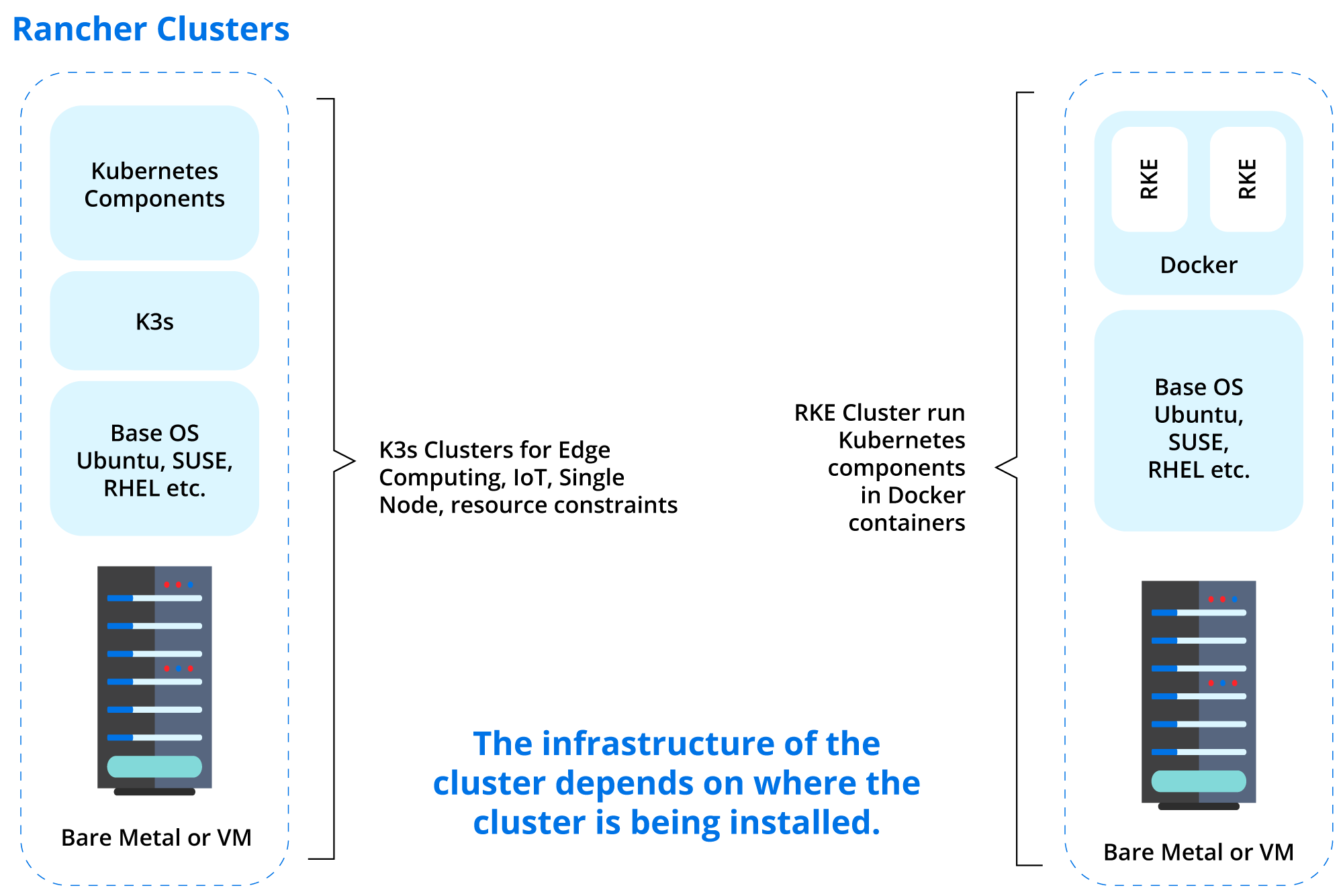
Rancher can be installed on most popular operating systems. In specific scenarios, the underlying operating system may need to meet specific requirements. Neither RKE2 nor K3s depends on a separate container engine such as Docker — both embed containerd directly, so the main requirement is a supported Linux kernel and distribution. See the RKE2 requirements and K3s requirements pages for the current list of supported operating systems and hardware.
OpenShift and RHCOS
OpenShift takes a different approach. Red Hat Enterprise Linux CoreOS (RHCOS) is the default and only supported operating system for OpenShift’s control plane nodes. RHCOS is based on Red Hat Enterprise Linux (RHEL) and benefits from all of the security patches and package updates that Red Hat delivers. Worker nodes have a bit more flexibility: they can run RHCOS (the default) or RHEL, though only a subset of OpenShift’s automated OS management applies to RHEL workers.
RHCOS does not have a traditional package manager or a way to update only part of the system. Instead, host operating system upgrades are delivered via new images written to disk. A reboot triggers the system to boot into the upgraded image. Tying RHCOS updates to the OpenShift upgrade process keeps the host systems updated and in line with the rest of the cluster.
Spend less time optimizing Kubernetes Resources. Rely on AI-powered Kubex - an automated Kubernetes optimization platform
Free 30-day TrialRancher vs. OpenShift: Deployment & Upgrades
Installing and planning the upgrade path for your cluster is another area to consider when it comes to the differences between Rancher vs. OpenShift.
Both Rancher and OpenShift have the same goals of simple installation, support for multiple cloud providers, and resource efficiency to support edge computing. However, they go about achieving these goals differently.
Ultimately when using Rancher, you are deploying a Kubernetes cluster (RKE2 or K3s) and using Rancher as the interface to manage it. The underlying install could be different with on-prem vs. cloud. With OpenShift, no matter where you install it, the underlying platform is the same.
Rancher vs. OpenShift: Deployment & Upgrades
| Category | Rancher | OpenShift |
|---|---|---|
| On-Premise Installs |
Rancher supports any CNCF-certified Kubernetes distribution. For on-premise installs, Rancher typically uses RKE2 or the lightweight K3s binary, and can be installed on top of the most popular operating systems.
|
OpenShift has a customizable and guided installer. It can be installed on bare-metal or using VMs via vSphere or OpenStack.
|
| Edge/Single Node/Limited Installs |
Rancher has developed K3s (a play on k8s) for installs with limited resources.
|
OpenShift has SNO (Single Node OpenShift).
|
| Upgrades / Downgrades |
Rancher itself can be upgraded via the console. Upgrading and managing Rancher may not upgrade the underlying RKE2 or K3s cluster; that’s handled separately, either through the Rancher UI or RKE2’s own manual or automated upgrade paths. Downgrades generally aren’t supported directly and instead rely on restoring from an etcd snapshot backup.
|
OpenShift can be upgraded via the CLI or the web interface. See the current cluster update documentation for details. Downgrades are not supported. |
When to use Rancher vs. When to use OpenShift
Even after you understand the similarities and differences between Rancher vs. OpenShift, it is difficult to say one way is objectively better than the other.
However, there are several use cases where one of the platforms is generally a better fit. Below, we’ll list those scenarios.
Spend less time optimizing Kubernetes Resources. Rely on AI-powered Kubex - an automated Kubernetes optimization platform
Free 30-day TrialConsider Rancher if…
- You are already using Kubernetes locally or on a primary cloud provider.
- You do not have requirements for the host operating system
- You need more flexibility in the different components of your cluster
- You want to make more decisions about the components of your cluster
- You have limited resources and can start small, i.e., a single node cluster
Consider OpenShift if…
- You are already familiar with Red Hat products or have a Red Hat Subscription
- You run applications that require certification on the operating system
- You want to run air-gapped installations
- You want to manage a private registry
Try It Out!
If you’re still undecided, both Rancher and OpenShift have versions that you can install and test on a single machine.
Rancher Desktop / K3s
Getting Rancher installed and running a minimal Kubernetes cluster on your desktop is as easy as installing an application. Rancher Desktop streamlines the installation and configuration process and allows you to launch a Kubernetes cluster quickly.
With Rancher desktop, you install a K3s deployment of Kubernetes. K3s are suited for installation on a single machine and even support production workloads.
Red Hat OpenShift Local and OKD
Red Hat offers OpenShift Local (formerly known as CodeReady Containers) for single-node testing. It’s intended for testing and is _not_ suitable for production.
You can also use OKD to get a feel for what it’s like to use OpenShift. OKD is the upstream community platform from which OpenShift is built. This is where Rancher and OCP are a bit different: to get Red Hat’s support, you need to use OpenShift, built based on the corresponding version of OKD.
Conclusion
Deciding on the infrastructure to run your applications can be daunting. Nobody wants to make the “wrong” decision. Knowing your options and how they match your specific needs is always a crucial step.
This article covered SUSE Rancher and Red Hat’s OpenShift, and their overall goals to make it easier to manage Kubernetes clusters. Both of them back their products with professional support.
It is worth highlighting again that Rancher is a Kubernetes cluster manager. It can manage almost any CNCF-certified Kubernetes cluster. It uses CNCF-certified RKE2 or K3s for the underlying cluster, depending on whether the priority is security and compliance or a small footprint.
OpenShift is also a CNCF-certified Kubernetes distribution, but Red Hat has made some opinionated choices on the different components, such as their ingress controller and other networking components.
Now that you understand the differences between these platforms, you can make a more informed decision about Kubernetes management at scale.
FAQs
What is the main difference between Rancher vs OpenShift?
Rancher is a Kubernetes cluster manager that can manage multiple CNCF-certified clusters, while OpenShift is a Kubernetes distribution with additional enterprise features, developer tooling, and security defaults.
When should I choose Rancher vs OpenShift?
Choose Rancher if you need flexibility, already run Kubernetes clusters, or want a lightweight option like K3s for edge or single-node installs, or RKE2 where CIS-benchmark compliance matters. Choose OpenShift if you require Red Hat enterprise support, certified operating systems, or built-in security and registry features.
How do Rancher vs OpenShift handle upgrades?
Rancher upgrades its management layer separately from the underlying RKE2 or K3s cluster, and downgrades can be done via snapshot restore. OpenShift upgrades clusters through the CLI or web console but does not support downgrades.
What operating systems are supported by Rancher vs OpenShift?
RKE2 and K3s can run on most popular Linux distributions, since both embed their own container runtime. OpenShift’s control plane only supports Red Hat Enterprise Linux CoreOS, a container-optimized OS with integrated updates tied to OpenShift releases, though worker nodes can also run RHEL.
Are Rancher vs OpenShift both open source?
Rancher, RKE2, and K3s are fully open source and do not require a subscription. OpenShift is enterprise software requiring a Red Hat subscription, although its upstream community project, OKD, is open source.

Try us
Experience automated K8s, GPU & AI workload resource optimization in action.
Try us
Experience automated K8s, GPU & AI workload resource optimization in action.

 Video
Video 
 Guide
Guide