 Kubernetes GPU
 Kubernetes GPU: Architecture, Frameworks, and Best Practices
Chapter 1
The race to build and deploy AI is being run on GPUs and increasingly orchestrated by Kubernetes. It is the de facto orchestration layer for most compute-intensive ML workloads, such as LLM training, batch inference, and real-time inference. While Kubernetes brings several aspects of modern infrastructure, such as declarative configuration, self-healing, and portability for ML workloads, it does suffer from inherent differences in how GPU and CPU optimization are affected.
Since GPUs are scarce, they need to be kept at high utilization at all times, while prioritizing applications that need them. This article explains the architectural concepts behind using GPUs in Kubernetes, the frameworks you can use on top of them for ML workloads, and the best practices for infrastructure optimization.
Summary of key Kubernetes GPU best practices
| Best Practices | Description |
|---|---|
| Orchestrating GPUs with Kubernetes | Utilize the strength of Kubernetes as a control plane along with modern frameworks for portable and distributed GPU-based workloads optimized for resource utilization and workload type. |
| Setting resource limits and counts | Be deliberate about the numbers you set when configuring limits and counts. Requesting 2 GPUs when your workload only saturates 1 is a common antipattern. Similarly, using a GPU with higher memory capacity to run a workload that requires only a quarter of its memory wastes resources in the shared pool. Use GPU sharing strategies in such instances. |
| Optimize node pool designs | Ensure that general-purpose workloads do not run on GPU nodes. It results in the CPU being blocked from performing that task and the GPU being unavailable. Do not mix different GPU types in a single pool, as this results in suboptimal usage of GPU memory and compute profiles. |
| Use GPU sharing | GPU sharing strategies such as time slicing, multi-instance GPUs, and multi-process services can be used to optimize GPU utilization. |
| Gang scheduling | This technique helps pods belonging to a specific group start simultaneously. This is extremely helpful in distributed training jobs where all pods need to start at the same time to avoid a partial allocation. |
| Bin packing | This technique helps place pods in as few nodes as possible, rather than balancing them across the cluster. This helps keep GPU utilization high at all times. |
| GPU observability | The observability stack must expose utilization metrics and not just memory usage. Use utilities such as the DCGM exporter and tools like Prometheus or Grafana to get the full picture of GPU utilization. |
| Cost and FinOps | Frequently review the resource quotas and the GPU bills to attribute spend to individual teams and use cases. Review GPU utilization and the workloads allocated to them to reclaim capacity. This can be done manually or using an automated tool like Kubex. |
-

Predict optimal GPU / XPU needs using transparent machine learning
-

Automate w/ a purpose-built controller based on the Nvidia KAI scheduler
-

Use agentic AI for workload analysis and scenario modeling


Kubernetes for GPU orchestration
Kubernetes is the de facto standard for workload orchestration in modern infrastructure. It abstracts away the complexity of scheduling, lifecycle management, and scaling heterogeneous clusters running different workloads. Many organizations prefer to run their training and inference workloads on Kubernetes alongside their web services.
Although using Kubernetes for ML/AI workload orchestration brings several advantages, such as multi-cloud portability, a rich ecosystem, and declarative models, the challenge is that GPUs differ significantly from CPUs, and Kubernetes was not built with GPUs in mind.
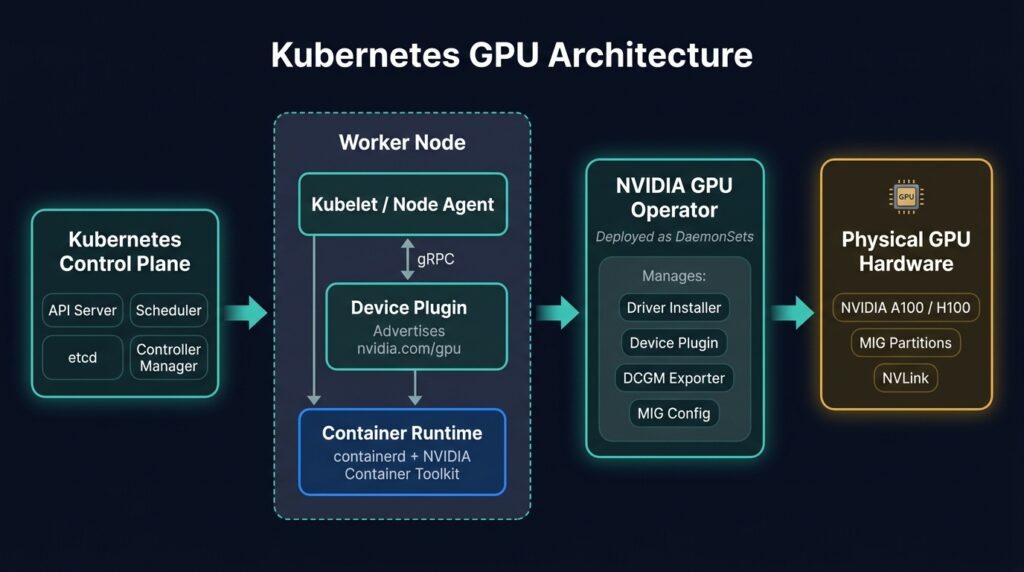
Architecture of GPU-based worker nodes integration in Kubernetes
Device plugins and GPU operators
A separate abstraction layer is required to integrate GPUs in Kubernetes. The device plugin layer enables GPU manufacturers to expose their resources to the Kubernetes scheduler without modifying the core codebase. A device plugin is a DaemonSet that runs on each cnode to enable discovering hardware.
In the Kubernetes world, a DaemonSet is a workload type that ensures a specific pod runs on a specified subset of nodes in a cluster. Beyond using the plugin:
- Install relevant drivers
- Configure container runtimes
- Establish logging
Hardware manufacturers like NVIDIA and Intel provide GPU operators that bundle all these components into a single module. This creates a hardware abstraction layer that helps platform teams to treat the GPU as a schedulable resource.
The device plugin model is now being succeeded by Dynamic Resource Allocation (DRA). DRA reached general availability in Kubernetes 1.34 and is on by default. Instead of exposing a GPU as a simple, countable resource, DRA lets a workload describe the device properties it needs, and the scheduler matches and allocates the hardware. NVIDIA ships a GPU DRA driver that supports fractional and partitioned GPU requests through this API. Teams on 1.34 and later should treat DRA as the long-term path, while device plugins stay common on existing clusters.
Challenges in GPU Scheduling
Once the GPU is available as a schedulable resource, the next challenge is to maintain high utilization. GPU, being an expensive resource, can not be left idle. The default Kubernetes scheduler allocates the GPU in its entirety per container, so even the smallest GPU inference jobs still require a full container. Solutions like NVIDIA Multi-instance GPU (MIG) and Multi-Process Service (MPS) help mitigate this.
Another challenge is CPU bottlenecks. To keep GPUs busy, the data pipelines need to be as fast as possible so GPUs are not waiting for work.
Prioritizing jobs adds another layer of complexity. While Kubernetes supports priority labels and preemption, applying them to GPUs requires deliberate policy designs. Additionally, some distributed jobs require all pods for that job to be scheduled simultaneously, starting and stopping at the same time. How to mitigate these challenges is given in the next sections.
Key frameworks to enable Kubernetes for ML orchestration
Compared to web applications and microservices, ML workloads pose unique challenges. For example,
- A training workload requires coordinating across multiple pods to launch them together, share state, and terminate them cleanly.
- An inference workload requires dynamically loading large weights, efficiently managing GPU memory, and handling unique traffic patterns that differ significantly from those in web applications.
ML-specific Kubernetes frameworks provide higher-level abstractions, such as custom resource definitions and operators, beyond the standard Kubernetes architecture to better handle the challenges associated with training and inference workloads.
Kubeflow
Kubeflow provides a unified set of tools to handle all stages of the ML lifecycle, such as experimentation, distributed training, hyperparameter tuning, pipeline and orchestration, and batch inference, all within the same cluster.
Its core functionality is a distributed TrainingJob abstraction that supports frameworks like TensorFlow and PyTorch. TrainingJob helps ensure that all pods start together and that failures, restarts, etc., are handled gracefully.
Another key feature of Kubeflow is the Katib framework, which helps run multiple versions of the same experiment in parallel on the cluster to facilitate hyperparameter tuning.
For batch inference, Kubeflow supports running large-scale prediction jobs against datasets stored in object storage, using the same distributed job abstractions as training.
Kubeflow ties multiple stages of the ML lifecycle through the concept of pipelines. Pipelines enable teams to define multi-step ML flows as directed acyclic graphs where each step can be run in isolated pods. Reusability and versioning of pipelines support a smooth transition from experimentation to production.
KServe
Challenges involved in serving a trained model for real-time inference are significantly different from training a model. The serving infrastructure needs to load large artifacts, provide a low-latency endpoint, and scale from zero to high bandwidth in response to the load patterns.
Kubeflow provides a boilerplate that abstracts away all this behind a single InferenceService resource. You can simply declare the framework type, point it to the model in object storage, and let KServe handle the rest.
KServe integrates with the NVIDIA Triton server for GPU-intensive workloads. It can load multiple models on the same GPU with dynamic batching. Dynamic batching groups requests that arrive in close temporal proximity to improve GPU utilization. KServe also supports configurations to warm up models for addressing latency issues.
Another aspect of KServe is its support for canary deployments, which enables developers to route a small portion of traffic to a newer model while allowing the original model to handle the majority of traffic. Teams can experiment with different models before replacing an incumbent model.
GPU sharing strategies
The default Kubernetes configurations allocate each GPU exclusively to a single pod. The GPU is fully reserved even when only a fraction of its capacity is used. GPU sharing strategies address this problem.
Time slicing
Time slicing involves the GPU context switching rapidly between multiple workloads, giving each a slice of its available time. This is similar to CPU time-sharing across multiple processes. The NVIDIA device plugin supports this by exposing a single GPU as multiple logical replicas.
The advantage of time slicing is that no special hardware partitioning is necessary. The disadvantage is that there is no memory isolation between the processes. So if one application uses too much memory, it can cause an out-of-memory exception for others. Hence, time slicing is common for batch inference and experimentation workloads but rare for production inference use cases.
Multi-GPU instance
Multi-GPU instances are supported by modern GPUs such as the NVIDIA H100 and A100. Here, the GPU hardware itself is partitioned into multiple instances, each with its own compute, L2 cache, and memory bandwidth. For Kubernetes, each instance looks like a different, smaller GPU.
This strategy provides isolated memory but is inflexible because instances are fixed within a slice, and dynamic resizing is difficult. There is effort required to match instance sizes across workloads.
Multi-process service
MPS, or multi-process service, enables multiple CUDA processes to share a single GPU with less context switching than time slicing. This is made possible by aggregating multiple CUDA contexts in a single context at runtime. As with time slicing, MPS does not provide memory isolation, and a fault in one process can affect other processes. However, for workloads involving several smaller inference tasks that use CUDA work boosts in a scattered manner, MPS provides higher throughput than timeslicing.
Deploying and using GPU sharing strategies correctly goes a long way toward realizing value from your GPU clusters. Platforms like Kubex can autonomously optimize GPU resource allocation by recommending effective sharing strategies. Kubex provides MiG-aware optimization and advanced time-slicing configurations.
Fractional GPU sharing with KAI
Time slicing, MIG, and MPS all run inside the NVIDIA stack. A fourth option works at the scheduler level. The KAI Scheduler is an open-source, Kubernetes-native GPU scheduler released by NVIDIA from the Run:ai platform. It joined the CNCF as a sandbox project in early 2026. KAI collocates multiple pods on the same GPU, so several workloads share one physical card as fractions. It also adds queues and quotas to divide GPU capacity across teams.
KAI runs the sharing layer, but it does not decide how large each fraction should be. This is where Kubex adds value. Kubex rightsizes each KAI fraction from observed utilization, exports sharing-aware GPU metrics, and runs a KAI-aware bin-packer to consolidate fractional workloads onto fewer nodes. When a pod’s GPU compute rises above its allocated fraction, Kubex upsizes the allocation in place and evicts only when the node has no room. In one reference deployment, automated rightsizing took a workload from 8 GPUs to 3, a 62% cut in node and GPU cost.
Best practices while using GPUs with Kubernetes
Now that you understand the challenges of Kubernetes GPU orchestration and the advanced sharing strategies necessary, let’s focus on some key best practices.
Setting resource limits and counts
Kubernetes resource requests determine where to schedule a pod and its resource limits. The foundational aspect of working with Kubernetes is ensuring limits are set correctly. Over-requesting blocks other pods, while under-requesting can lead to instability and errors. The challenge is that the right values often vary based on model size, batch size, sequence length, and traffic patterns.
A platform like Kubex can help here by continuously analyzing historical utilization data across GPU compute and memory, and recommending precise resource request values grounded in actual workload behavior.
Optimize node pool design
Organizing GPU nodes into pools by workload type and class can help efficiently match workloads to instance types. A typical cluster contains training, inference, and experimentation node pools. Node labels and Kubernetes node selectors or nodeAffinity rules ensure that workloads are assigned to the right pool. A typical node pool design config is as follows.
affinity:
  nodeAffinity:
    requiredDuringSchedulingIgnoredDuringExecution:
      nodeSelectorTerms:
      - matchExpressions:
        - key: nvidia.com/gpu.product
          operator: In
          values:
          - NVIDIA-H100-80GB-HBM3
Platforms like Kubex can continuously monitor this allocation and flag up when it identifies wasted resources.
Use GPU sharing
Sharing strategies such as time slicing, MiG, and MPS help optimize GPU utilization. You can configure time slicing using the NVIDIA device Plugin. For MiG, configure each node profile before scheduling workloads.
Platforms like Kubex can bring intelligence to these decisions by analyzing cluster utilization and recommending optimal strategies, rather than relying on default values. Kubex also integrates Hami-core to address memory isolation in the time-sharing strategy.
Gang scheduling
For distributed training jobs and large inference jobs, place all the pods involved in the operation simultaneously. Partial placement of pods results in GPUs idling while waiting for work and in deadlocks. Placing pods simultaneously to meet this requirement is called gang scheduling. Use the gang scheduling plugin to achieve this. A sample configuration of gang scheduling would look as follows.
apiVersion: scheduling.k8s.io/v1alpha2
kind: PodGroup
metadata:
  name: distributed-training-job
  namespace: ml-workloads
spec:
  minCount: 8   # renamed from minMember in the in-tree GangScheduling plugin
Here, the minCount parameter indicates that the scheduler must wait to place pods until 8 can be placed simultaneously.
Gang scheduling is part of a larger batch-scheduling story. Production GPU clusters also need queues and quotas to share capacity across teams, priority and preemption to favor urgent jobs, and topology-aware placement to keep distributed pods on well-connected nodes. The default Kubernetes scheduler does not cover these. The KAI Scheduler handles gang scheduling automatically through its PodGrouper and adds fractional GPU sharing. Kueue adds a queue layer on top of the default scheduler. Volcano brings hierarchical queues, preemption, and Dominant Resource Fairness for HPC-style batch jobs.
Bin packing
The default Kubernetes scheduler places pods across nodes to achieve a uniform spread of GPUs. It is better to pack workloads into fewer fully allocated nodes. Kubernetes supports this through the ‘NodeResourceFit’ plugin, providing a scoring strategy called MostAllocated. This scoring strategy assigns a higher weight to GPUs when they are fully utilized; hence, the NVIDIA operator prioritizes filling GPU capacity over CPU and memory.
Kubex actively monitors GPU utilization in real time and can suggest strategies and bin packing configurations.
GPU observability
GPU observability in Kubernetes requires instrumentation across the hardware, container runtime, workload, and scheduler layers. The starting point is the NVIDIA DCGM Exporter, which exposes GPU metrics as Prometheus-compatible time series. It is deployed as a DaemonSet and can monitor per-GPU utilization, memory usage, temperature, power draw, etc. Complement DCGM metrics with Kubernetes-level signals such as pod scheduling latency, queue depth, resource request-to-actual utilization ratios, etc.
Cost management and FinOps
GPUs are expensive, and staying idle can increase the cloud costs in no time. The foundational aspect of cost management is attributing costs correctly to teams and workloads. Your organization must implement extreme discipline in consistently using Kubernetes namespaces, labels, and annotations to tag workloads by team, project, and cost center.
Once the tagging discipline is in place, teams can use tools like OpenCost or Kubecost to calculate per-namespace and per-workload GPU costs based on node pricing and utilization shares.
Conclusion
Kubernetes provides a great foundation for orchestrating GPUs, but building it optimally requires deliberate decisions across several configurations, such as device plugins, node pool design, sharing strategies, cost management, and FinOps.
Real-time Kubernetes analytics platforms like Kubex provide insights on when to use what based on continuous monitoring. Its AI-driven analytics help increase throughput and reduce costs on the same hardware.

Try us
Experience automated K8s, GPU & AI workload resource optimization in action.
Try us
Experience automated K8s, GPU & AI workload resource optimization in action.

 Paper
Paper 
 Video
Video