

Autonomous K8s Optimization Involves Both Compute and Storage Resources – Are You Doing Both?
One of the most powerful capabilities in K8s is the ability to autoscale resources to meet demands, scaling resources up during peak periods to ensure performance, and down again during lower periods to save money.
This is true of compute resources, where effective pod sizing and node autoscaling are key, as well as storage, where persistent volumes must always have resources to meet the demands of applications. But in practice this is very tricky to do – compute resources are notoriously mis-configured, node scaling can be sub-par because of this (and many other reasons), and storage has no autoscaler at all!
In this 30 minute joint session, Lucidity and Kubex walk you through what end-to-end K8s optimization looks like when you address both layers together. We cover:
- How to identify and eliminate compute waste across your clusters,
- How storage provisioning patterns create hidden costs and I/O constraints, and
- How to build a continuous optimization practice rather than a one-time cleanup.
Expect real examples, not slides full of theory. You’ll leave with a clear picture of where waste is hiding in your environment and a prioritized approach to addressing it.
[Video transcript]
Hello and welcome everyone to the Kubex and Lucidity webinar. Autonomous Kubernetes optimization involves both compute and storage resources. Are you doing both?
One of the most powerful capabilities in Kubernetes is the ability to auto-scale resources to meet demand, scaling resources up during peak periods to ensure performance, and down again during lower periods to save money.
What we’re going to do in today’s session is walk you through what end-to-end Kubernetes optimization looks like when you address both layers together. We’ll share some real examples and demos, and we’ll leave time at the end for your questions.
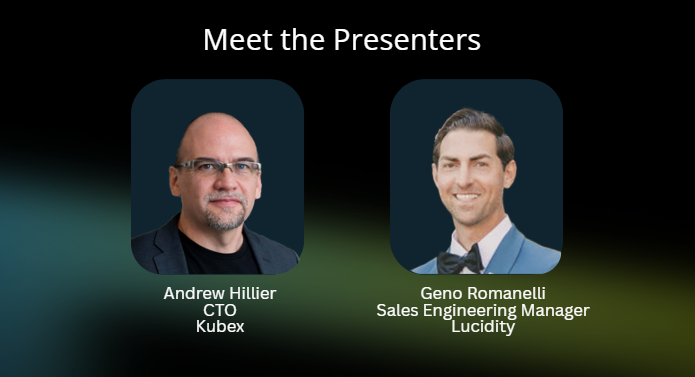
Our presenters for today are Andrew Hillier from Kubex and Geno Romanelli from Lucidity. And with that, I’m going to pass the mic over to Andrew to get us started.
Okay, thanks Daniella, and thanks everyone for joining us. I’ll just dive right in. I’m going to go first, then Geno’s going to go. I’m excited for this webinar today because it’s interesting to see the parallels between our two products.
At Kubex, we do resource optimization mostly on the compute side. On the GPU side, we do a bit of ephemeral storage, the local storage on the nodes. But Lucidity does exactly what we don’t do, which is the broader storage and persistent volumes in these environments.
We’re going to focus on Kubernetes. We also do cloud optimization. Lucidity also does cloud storage optimization, so you never know, we might have a follow-up webinar on that topic. But let’s focus on Kubernetes, probably on ECS, and we can talk about other variants as well.
I’m going to start off from a compute CPU and memory perspective, the problem we see when we look at a Kubernetes environment. There are multiple problems here. There’s inefficiency and there are risks. We see a lot of cases where there’s both inefficiency and risk at the same time.
I have too many nodes running for the work that’s being done, but I also have out-of-memory kills and throttling. We address all of those things, but one of the simplest ways to see it is by looking at the aggregate resources running in an environment.
This could be an entire company. In this case, it’s just a set of labs. We see quite a bit of inefficiency, and we also see a lack of automation in this area.
Kubernetes does support very high automation in certain ways, such as horizontal scaling and node auto-scaling. But when it comes to resource settings, it’s not so good. What you end up with is a picture like this.
I’m going to start with the orange line. The orange line represents the CPU requests on the left and the memory requests in an environment. That’s how much the application teams are asking for. They might be running a container and asking for 2,000 millicores, 10,000 millicores, or 100 millicores.
But the problem is they usually ask for more than they’re using. The blue line is what’s actually being used, and you see it’s less than half of what’s being requested. There are good reasons to have some buffer there, but often we see too much buffer.
If I look at that orange line and it’s far from the blue line, that means I have pods that are too big. I’ve been asking for too much CPU or memory capacity when I deploy pods.
The gray line represents the allocatable resources in the nodes. That’s what the node autoscaler is effectively turning on. In this case, I’m asking for roughly 500 cores or just under. I’m using less than half of that, under 200 cores, but it’s running over 750 cores in the Karpenter environment, machine sets, scale groups, or whatever the node autoscaler is using.
The gray line being above the orange line tells us that we need more efficiency in the node autoscaling. We’re running too many nodes. Kubernetes has to run enough capacity to meet the orange line, but it shouldn’t have to run much more than that if it’s operating efficiently.
There are various reasons why that gap might be bigger, but the idea is we want to get that orange line down closer to the blue line by optimizing the pod resources. Ideally, that gray line would automatically come down closer to the orange line, or we might need to give it a nudge through things like bin packing or optimizing the node types.
Even in this example, if you’re familiar with this, you can see that the memory on the right, the gray line, is really high, meaning I’ve got a ton of memory deployed that’s not even being requested. Maybe I can just change my node type to a compute-optimized or general-purpose node with a higher CPU ratio and save a bunch of money right off the bat.
We can see quite a bit by looking at this. We see a lot of inefficiency. We see that there are probably autoscaling efficiencies to be had, and that’s exactly what we focus on.
What we do is gather all the relevant data from the containers, the nodes, and the cloud services underneath. We also do cloud services, so if Kubernetes is running on the cloud, we model that side of it as well.
We perform a deep analysis to figure out the meaningful patterns of activity in the container usage. For example, what you’re looking at is a 24-hour time-of-day pattern saying, “This container usually gets busy around 9:00 AM until about 4:00 PM, and it has peaks and sustained activity.”
As we understand the activity pattern of each container and pod, how they map to namespaces, and also the replication patterns, for example, maybe it’s using HPA and scaling up to 200 copies midday and back down to 50 overnight, we gather and model all of that and analyze it using policies to figure out how to optimize the environment.
The recommendations come out at two levels. One is container sizing, the vertical scaling of containers. Maybe I should make some containers bigger, or maybe I should make them smaller. Maybe I should increase the limits, decrease the requests, or add values where none exist.
There’s a set of automatable container recommendations that come out of this analysis. We also generate node recommendations. Maybe I should be running on a different node type, a different shape, a different size, or scaling differently.
We also optimize GPUs. If you’re running AI workloads on GPUs in Kubernetes, we’ll optimize those too. For example, maybe you should be time slicing or fractionalizing those GPUs.
The system generates different recommendations at different levels to bring the orange line down and the gray line down, or up, as the case may be. It goes both up and down, but in most environments the net effect is down, which means saving money.
All of that is fed into an automation controller. We have a pretty advanced automation controller that can just make it happen automatically.
This is becoming very popular because people don’t want to manually edit 10,000 containers in an environment, and doing it through a GitOps flow can be challenging. We’re finding that a mutating admission controller, and we also do in-place resizing, can make it happen automatically.
We can do closed-loop automation to drive these savings. You basically turn it on, build trust in the recommendations, make sure they look good, and then enable automation to fix the resource situation automatically.
We also have an agentic framework built in. Everything up to this point is deterministic, it’s all math-based and can be fully automated.
We also have a set of agents that handle more advanced functions, like determining how big the next container should be, whether HPA is configured properly, whether we should tune HPA settings, or optimize bin packing and Karpenter configurations.
Some of these are deterministic, and some are AI-driven. The AI-based agents can use reasoning to provide advanced recommendations, but you may want human approval before implementing them.
So we have a combination of deterministic and agentic use cases. The core automation is deterministic, but it still does very powerful things.
From an automation perspective, the automation controller is a key piece. We’ve done a ton of R&D to ensure it operates correctly and safely, and I want to emphasize safely.
You don’t want to enable automation and accidentally disrupt your services. This controller automatically adjusts requests and limits. It has a mutating admission controller and supports in-place resizing. It also has extensive policy controls over exactly what it’s allowed to do.
For example: don’t touch the limits, just touch the requests; don’t touch certain namespaces, and so on. The idea is that you can turn it on and let it safely optimize the environment.
What you see here on the top left is the system increasing a CPU request without touching the limit. The purple line is unchanged. For memory, we’re bringing down both the request and the limit.
The system will make things safer. It upsizes resources to prevent out-of-memory kills and throttling, ensures containers request enough resources, and avoids overstacking the nodes.
It also downsizes oversized workloads, and that’s where most of the savings happen. Usually the net result is significantly lower resource consumption and major cost savings.
Everything is policy-driven, with extensive safety checks. These include making sure it doesn’t interfere with HPA. If you do this incorrectly, HPA can start doing unbounded scaling. If you scale the metric HPA is working against, you can trigger huge scaling swings.
The system understands HPA and won’t conflict with it. It understands the nodes you’re running on and won’t create unschedulable workloads. It understands quotas and limit ranges. It even performs dry runs to ensure containers will restart successfully after changes.
The result is a system you can safely turn on and trust to optimize resources automatically.
What that looks like in practice is the orange line moving closer to the blue line. It’s easier to see on the memory chart. Once automation is enabled, the system right-sizes workloads, some up, some down, but mostly down, until the requests align more closely with actual usage.
Depending on workload volatility, you can get closer or farther from the ideal alignment. The system gets as close as is safely possible while still maintaining enough headroom to absorb bursts and peaks.
Once the orange line comes down, the gray line should follow. That’s where the cost savings happen. In some cases, the gray line needs a little help.
In this example, the container optimization brought the orange line down, but the gray line didn’t immediately follow because the max pods per node setting was too low. Once that was fixed, the node count dropped by half.
That’s what good looks like: right-sized pods and right-sized nodes. The environment becomes safer because the limits are sufficient, and more efficient because it’s running on much less infrastructure.
When we turn on the automation controller, this is typically what happens. We get the gray line down, get the orange line down, and make the entire environment more efficient and safer.
Back to the agents for a moment, they perform very specialized tasks. I won’t go through them all, but they handle things like HPA optimization, Karpenter node pool optimization, OpenShift machine sets, and bin packing.
Bin packing, in particular, is a sophisticated agent. It supports seven different strategies for scheduler optimization and autoscaler consolidation thresholds. It also handles StatefulSet affinities and many other tasks.
The idea is that each agent is highly task-specific. Some are deterministic, and some involve human approval. Together, they drive node-level optimization.
Here’s a view of the bin packer dashboard. It tells us where there are opportunities for better density, such as a GPU cluster or node group that could be packed more efficiently.
You can create your own agents, define custom logic, and integrate everything with MCP servers and enterprise frameworks.
A quick note on GPU optimization. GPU environments tend to look similar to CPU environments: the number of GPUs provisioned is far above actual utilization. GPU memory utilization is usually better, but there’s still significant waste.
By using techniques like MIGs or time slicing, we can reduce the number of GPUs required to run the same AI workloads. That lowers the cost per token and increases utilization efficiency.
On the right, you can see a GPU optimization map analyzing an LLM workload. It’s currently running on a full A100, but we’re recommending a quarter of an A100 instead.
The system evaluates all available GPU and CPU options, factoring in benchmarks, cost data, MIG compatibility, and time slicing capabilities.
Sometimes it can even determine that a workload can run on CPUs instead of GPUs.
The point is that AI infrastructure can be optimized significantly through GPU fractionalization.
What I’m looking at now is a top-level dashboard of a Kubernetes environment. On the left, you can see dashboards, containers, nodes, automation, and cloud services.
This environment consists of 18 clusters and about 2,100 containers, a set of labs. As described earlier, there’s significant inefficiency, with over-requested resources and over-provisioned nodes.
The gray line is much higher than actual utilization. I can also see saturated nodes, maxed-out pod counts, throttling, and out-of-memory kills.
This is the “before” state.
Now I’m going to switch to a cluster that’s already been optimized. You can see the automation threshold coming down after automation is enabled. Requests come down, then nodes come down.
This environment now has no saturated nodes, no max pod issues, and no throttling or out-of-memory kills. The automation controller automatically upsizes and downsizes as needed.
I can also open the automation tab and see the actual automation events. Here’s a container dynamically adjusting requests and limits over time to safely optimize the environment.
At this point, a question comes in:
“How do you handle apps that spike at startup, then level off much lower during normal workloads?”
That’s a great question, especially for JVM workloads.
The algorithm sets requests and limits independently. Typically, the limit is set above the highest observed peak over a long history window, usually 95 days. We don’t want the limit below that high-water mark.
The request, however, is based on sustained activity, because sizing requests to peak is very wasteful.
So the short answer is: we size the limit above any observed spike, and we size the request based on sustained usage. The app may burst above the request at startup, but once it settles, the request reflects the steady-state behavior.
This is especially important for JVMs, where startup spikes are common. We ensure the limits stay high enough to avoid constraining garbage collection or startup activity.
We also support more advanced dynamic sizing through AI agents. For example, one of the strategies we’re exploring is allowing JVMs to start up normally and then shrinking the requests after they stabilize.
The key is ensuring limits never constrain workloads while requests remain safe and efficient.
As long as the nodes have enough capacity for all those startup spikes, the system remains stable and efficient.
I’ll wrap up quickly so Geno has enough time.
These are the agents. I won’t go through all of them, but I can enter an agent context and ask questions like, “Can I do dynamic sizing for this pod?”
The system might answer, “Yes. Between 6:00 PM and 8:00 AM, you can run it at 234 millicores. During business hours, it should be 1,200.”
We’re also adding automation controllers for these AI-driven strategies so they can eventually be automated as well.
Finally, if I click over to GPUs, this environment has 15 AI workloads running on GPUs. For one of these LLMs, we’re recommending moving from a full A100 down to three-eighths of an A100, generating the corresponding MIG specification automatically.
You can also interactively explore why certain GPUs are recommended over others based on cost and performance.
You can use AI to optimize AI.
If you look at what I just showed, and compare it to the graphics on Lucidity’s website, the similarities are striking. They do something very analogous in the storage world.
I’m going to hand it over to Geno to explain how that works. Our products complement each other beautifully because we each optimize different layers of the stack.
Thanks, Andrew.
As Andrew mentioned, the handoff between Kubex and Lucidity makes a lot of sense. Kubex focuses on compute optimization, while Lucidity focuses on storage optimization.
At Lucidity, we look at the state of cloud block storage. We have an assessment tool that helps customers understand their storage utilization.
Most customers don’t actually know their storage utilization because hyperscalers make it difficult to understand true usage.
Our lightweight, read-only assessment pulls the data and analyzes where the waste exists from a storage perspective.
We’ve performed over 700 assessments, and the data is broken down by industry, operating system mix, and cloud provider.
This assessment can be run in just a few minutes to identify storage optimization opportunities.
The core problem we solve is over-provisioned, underutilized storage.
Why is that a challenge? Because customers provision extra capacity for growth. Whether they use it or not, they still pay for it.
Expanding storage is relatively easy. Shrinking it is hard. It often requires downtime, planning, data migration, and volume reattachment.
That means rightsizing storage becomes a manual and painful process.
Lucidity automates that process. We continuously expand or contract storage capacity to maintain healthy utilization levels, reducing waste and minimizing downtime.
Many customers tell us they’ve manually resized storage before, and it’s always a headache involving change windows, downtime, and planning. Sometimes it simply never gets done.
Lucidity eliminates that manual effort.
We’re application agnostic and work across AWS, Azure, and GCP. Customers often see storage cost reductions of up to 70%.
But beyond the savings, the key value is automation, freeing engineers from tedious manual storage management.
Since today’s focus is Kubernetes, let’s talk specifically about Kubernetes storage.
There’s a lot of compute waste in Kubernetes, but there’s no native autoscaler for storage. You can expand storage, but shrinking it requires manual intervention.
Lucidity Autoscaler for Kubernetes optimizes cloud spend, reclaims engineering time, and improves resiliency and uptime.
We focus on persistent volume optimization. Kubernetes uses a lot of ephemeral storage, but many workloads rely on persistent volumes, message queues, Elasticsearch, databases, and other StatefulSets.
This is where Lucidity delivers value.
We dynamically optimize persistent volumes and allow customers to track PV utilization in our dashboard.
Setup is minimal, and customers only pay for the storage they actually use.
How does it work?
Lucidity deploys a lightweight agent and CSI driver into the Kubernetes cluster. We only collect storage metadata, we are not in the I/O path.
We gather utilization, IOPS, throughput, and latency metrics and send them to the autoscaler.
The autoscaler analyzes the data and determines whether the persistent volume has too much capacity, too little capacity, or just enough.
If more capacity is needed, we expand it. If less is needed, we shrink it.
Expansion operations happen within seconds. Shrink operations take a few minutes because we want to ensure the workload has stabilized before reclaiming capacity.
All of this happens with zero downtime.
The setup process involves three steps:
- Install the Lucidity agent
- Install the CSI driver
- Onboard the persistent volumes you want Lucidity to manage
Now I’ll show you how simple the setup process is.
In the Lucidity dashboard, you can see pre- and post-Lucidity utilization, cost savings, expansion and shrink operations, and storage under management.
You can also see unmanaged persistent volumes and identify optimization opportunities.
To onboard a persistent volume, you simply install the Helm chart, deploy the agent, and then migrate the existing PV into Lucidity management.
For new StatefulSets, you can simply update the storage class so Lucidity manages the storage from the beginning.
Once Lucidity is managing the PVs, everything operates seamlessly in the background.
Here, you can see the current utilization and savings for a persistent volume.
The light green line represents actual data written to the PV. The dark green line represents provisioned capacity.
Over time, Lucidity brings provisioned capacity down while maintaining about 75% utilization, which balances operational safety with cost efficiency.
You can also see the real-time expansion and shrink operations happening automatically.
Expansion operations occur within seconds, while shrink operations take slightly longer to ensure application stability.
Everything is automated and happens with zero downtime.
Andrew and I have covered a lot in a short amount of time.
If you’re interested in a deeper dive with Andrew and the Kubex team, please scan the QR code for a demo tailored to your use cases.
Similarly, if you’d like to understand your storage utilization better, Lucidity can provide a free assessment within a few minutes.
Andrew adds:
I think it’s fascinating that in our world we work with HPA and node autoscalers, trying to make them more intelligent. In your world, there’s no autoscaler at all. That’s a huge gap that Lucidity fills.
It’s also interesting how similar our installation models are. We both use Helm charts and lightweight agents. We even have similar-looking graphics and QR codes.
It’s a really interesting partnership because the products truly complement each other.
I appreciate everyone spending time with us today. I hope it was worthwhile, and we look forward to helping you optimize your Kubernetes environments.
Thanks everyone.


