
Table of Contents
The Kubex UI is a model of analytic depth and flexibility. You can break down your environment’s utilization, risks, and optimization potential in many ways. You can view more than 100 different properties for each container and many different graphs showing historical performance and identified trends. It’s an ideal environment for an expert to be able to drill down to understand performance issues and wasted resources, comparing across clusters and namespaces and doing ad-hoc analysis to identify root causes and the most important optimizations.
However, not every user has the same expertise, and what’s essential for an expert can be overwhelming for a casual user. What can we do to help people get the insight they need, even if those people don’t eat, sleep, and breathe Kubernetes? There’s one question that almost everyone has where the answer isn’t always apparent: What should I do now?
Tool-based vs. Intent-based
The traditional ways in which computer UIs have been constructed leaves the “What should I do now?” question for the user to answer. This is UI as a “toolbox”, a collection of ways to examine and manipulate documents and data. The tools may be powerful, but understanding when and how to use them, and particularly how the different tools can be combined to achieve sophisticated effects, is a question of expertise. This “toolbox” metaphor goes back to the earliest days of user interfaces is perhaps most clearly seen in paint programs. Note how both MacPaint from 1984 and a recent version of Photoshop both offer a similar assortment of tools for the user to select from.
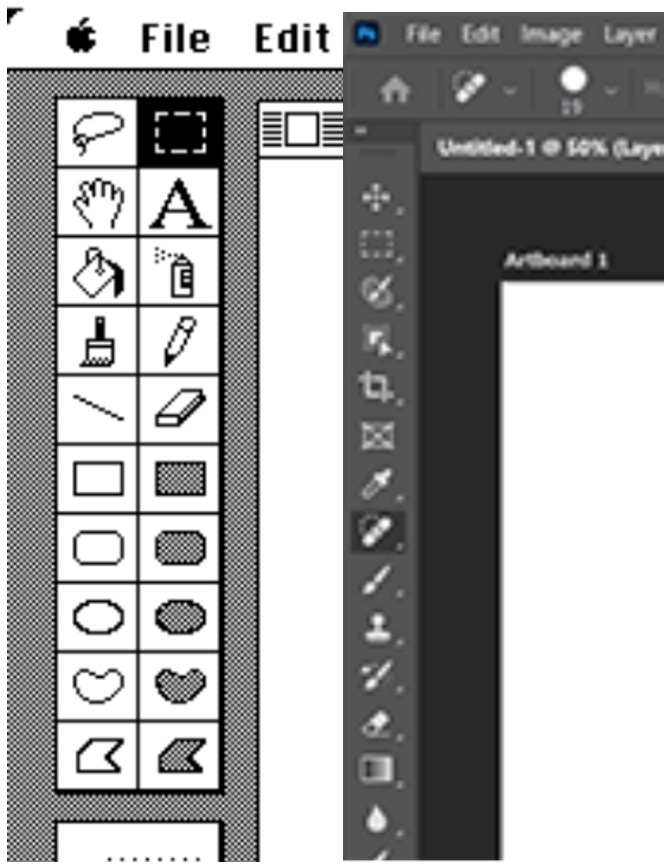
Left: MacPaint (1984), right: Adobe Photoshop (2024)
Of course we know that not everyone who attempts to use a paint program gets the results they’re looking for. The power of the tools allows experts to excel, but requires everyone else to develop expertise. Consider the contrast with modern LLM-powered image editors such as Google’s Nano Banana. With these tools it’s possible for an inexperienced user to get good results just by using words to describe the image they want to see. Rather than force the user to translate that vision into a complex sequence of tool operations that the user must then perform themselves in order to realize the result, the LLM can choose and apply the most appropriate tools for the job, and apply them with the power and precision of a computer.
That’s what we want Kubex to be: not simply a selection of tools and data, but an interface that can understand the user’s intentions and needs, and translate that into results that are appropriate, clear and actionable.
Example: Prioritization
How do we use an LLM to answer “What should I do?” By asking!
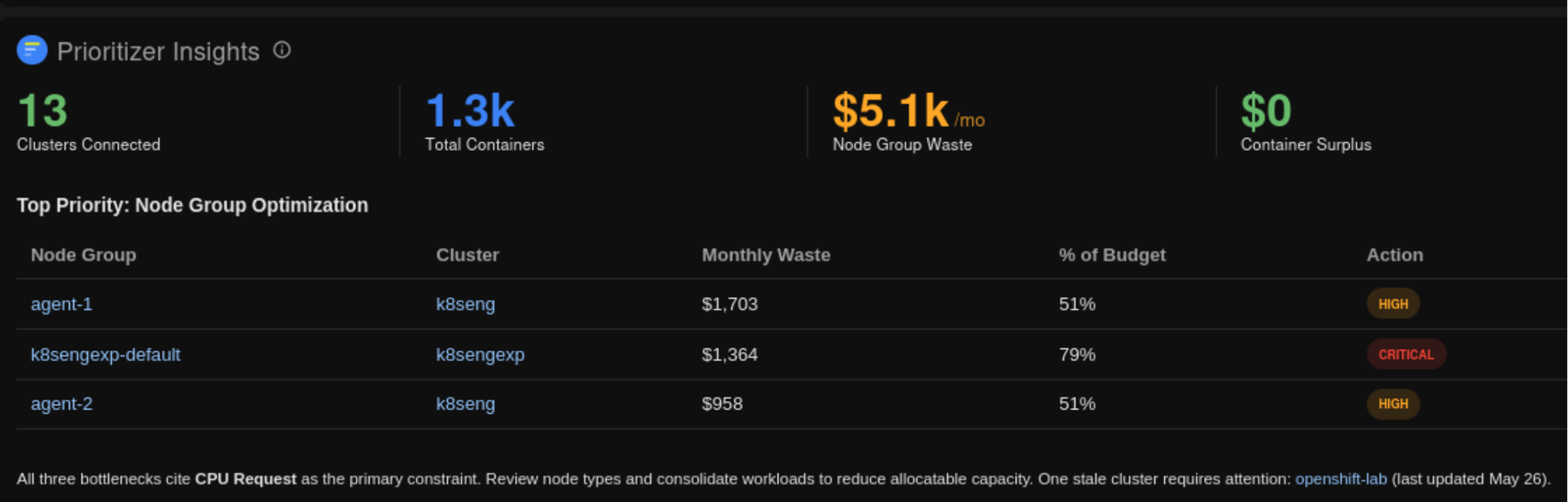
This widget evaluates the prompt “What should I do now?” as part of a larger prompt that instructs the LLM to do things like aggregate relevant KPIs and add links to pods and other system entities, and formats the result according to our overall UI design. The user can get a fresh answer every day (or whenever they choose to refresh the widget) that points them towards specific parts of their system that need attention.
Additional power comes from the fact that “What should I do now?” is just one of an infinite number of possible prompts that can be used: the user can customize it to reflect their specific role and interests. Are they responsible only for certain namespaces, or for clusters with names beginning “prd-“? Use the prompt to constrain the LLM’s queries and shape its presentation of results.
Example: Optimizing node utilization
Most of our users are interested in optimizing the cost of their Kubernetes clusters. It’s straightforward to get Kubex to recommend appropriate pod requests and limits for CPU and memory, and even to automate rightsizing live in the clusters, which is a key first step in the process. However, this doesn’t necessarily produce immediate cost savings. Ultimately costs are determined by the number of nodes, and there are many reasons why optimizing your pod resources might not translate into a reduction in the number of nodes. So the key question becomes: “how do I reduce the number of nodes in use?” This is simple to say but isn’t nearly as simple to answer as the question of rightsizing pod resources. The answer can depend on what workloads are running, predictable variability in load at different times of the day or week, and whether a cluster autoscaler is in use (and which one). The right thing for the user to do might be to reconfigure the Kubernetes scheduler to pack nodes more tightly, or it might involve changing the kind of cloud instances that make up the node pool (e.g., switching from memory-optimized to CPU-optimized instances). There isn’t one simple formula that every user can apply to realize actual cost savings.
How does an LLM help? We can leverage its reasoning powers to have our Agent assess the user’s particular situation and come up with a set of constructive steps that will allow the user to achieve actual cost savings. The Agent can identify the clusters that could benefit the most from node-level optimizations, determine what configuration changes should be made to improve utilization, and assess any scheduling constraints or problems that may be leading to inefficiency. It’s easy to modularize this so that we can improve and grow the set of optimization strategies over time. And, where there are steps that we can automate using the Kubex automation controller, the Agent can propose new automation policies and actions. Once the user approves, these policies are automatically implemented.
Moving from intention to solution
In order for this approach to work our Agent needs complete access to all the data in the Kubex UI, which it can query flexibly and interpret according to the user’s needs and goals. (Read my article about our MCP server for more about how we did that.) The reasoning capabilities of LLMs gives them the flexibility to be able to use the available data to solve many kinds of problems without explicit instructions, which is powerful but also risky if we can’t be sure that the approach it chooses is correct and consistent over time. For problems that are core to our business it’s critical for us to make sure that our Agent is approaching that problem in a reliable and well-understood way. Sometimes that means prompt engineering to explain to the Agent how we want it to approach problems, and even what algorithm we’d like it to use to come up with a particular kind of solution. Sometimes that means taking an algorithm, converting it to code, and exposing that as an MCP tool so that the Agent has an off-the-shelf implementation to rely on. This helps our Agent focus on the higher-level goal of helping users find their own path forward using this library of tools. Of course, we don’t limit users to solving exactly the problems we anticipate. As long as the problem relates to resource optimization, it’s fair game.
What’s next
We’re constantly looking for new and better ways to meet users where they are. Some of the things we’re looking at include:
More higher level capabilities: Increase the breadth of tools and guidance available to our Agent, to improve its reliability and efficiency.
Proactive agents: Rather than wait for the user to ask for solutions, anticipate their needs and come up with proposals for useful next steps.
Agentic integration: Kubex is only one part of our user’s technology stack. It’s natural for solutions to span multiple tools, whether that’s task tracking/PSA systems, observability tools, or infrastructure-as-code systems like Terraform. Having one agent that can work intelligently across all of these systems is an obvious goal, and agentic orchestrators like OpenClaw demonstrate the possibilities, but real uptake of these systems requires solving some hard problems involving authorization management and appropriate controls.
Conclusion
The rise of LLMs has profound implications for how we design and build software, and the user interface is an area where the potential of agentic approaches is especially clear. At Kubex we’re seizing the opportunity to use LLM-based approaches to build an interface that can respond directly to the goals and intentions of our users, making our product more accessible and impactful for them.
Credits
MacPaint By User:GRAHAMUK, Fair use, https://en.wikipedia.org/w/index.php?curid=429029
Photoshop By Adobe Inc. – Personal computer, Fair use, https://en.wikipedia.org/w/index.php?curid=74572887
Table of Contents

Try us
Experience automated K8s, GPU & AI workload resource optimization in action.
Get Started for Free


Get started with Kubex

Enter your email
Error: Contact form not found.
By signing up, you consent to the Terms of Service and Privacy Policy.
Need help? Contact Support