
Table of Contents
Updated October 16, 2026.
Cast AI is good at what it advertises: achieving savings quickly, automating aggressively, and handling Kubernetes cost optimization with minimal hand-holding. It’s a good choice for a team that wants a tool that drives cost optimization independently.
The challenges lie in the lack of control. The Cast AI node autoscaler replaces the standard components that add and remove nodes, such as the Cluster Autoscaler or Karpenter, the open-source node provisioner that AWS maintains. On EKS, Cast AI offers a second mode, the Karpenter Enterprise Suite, which manages Karpenter rather than replacing it. The two modes are mutually exclusive: you run either the Cast AI autoscaler or Karpenter with the Enterprise Suite, not both. Either way, Cast AI owns the node-provisioning layer, and that control cannot be toggled off.
Kubex, an alternative to Cast AI, uses a different architecture. It complements the autoscalers you already run rather than owning the provisioning layer itself, avoiding vendor lock-in and allowing you to choose best-in-breed solutions at every layer of the software stack.
In this article, we compare Cast AI to Kubex, not to declare a winner, but to explain the trade-offs for teams considering an alternative to Cast AI.
Kubex vs. Cast AI summary comparison
| Capability | Kubex | Cast AI |
| Autoscaler architecture and vendor lock-in risk | Enhances the autoscalers you already run instead of replacing them, so leaving is a configuration change. | Takes over node provisioning for deeper automation, so leaving means rebuilding how your nodes get provisioned. |
| GPU and AI workload selection | Compares GPU types side by side before you commit, which fits teams still choosing their hardware. | Runs the hardware you already committed to as cheaply as possible across 125 regions. |
| Agentic interface | A conversational agent answers questions and handles edge cases that nobody scripted in advance. | Four fixed automations that are fast and predictable for the scenarios they cover. |
| Node execution and stateful workloads | Prepares capacity before predictable traffic spikes but never touches the nodes themselves. | Acts directly on nodes and can move running workloads, including databases, between nodes without downtime. |
| Change governance | Flexible API supports integration with ITSM products like Jira or ServiceNow, or with GitOps pipelines. | Fits teams that approve infrastructure changes through GitHub pull requests. |
| Pricing model | Publishes its price per virtual CPU under management, so the cost can be modeled before signing. | No public rate, so budgeting waits on a sales quote. |
How to evaluate a Cast AI alternative
If you are weighing a Cast AI alternative, six criteria are where the differences show up: autoscaler architecture and vendor lock-in risk, GPU and AI workload selection, the agentic interface, node execution and stateful workloads, change governance, and pricing. Comparing Kubex to Cast AI across these dimensions surfaces a clear split, with Kubex the better fit for some and Cast AI for others. The sections that follow work through each one in order, starting with autoscaler architecture and vendor lock-in risk.
Autoscaler architecture and vendor lock-in risk
Most Kubernetes teams start with an open-source autoscaler. Cluster Autoscaler is the usual pick when the cloud does not support Karpenter, when staying cloud agnostic matters, or when the team has already invested in it; otherwise, Karpenter is the stronger default. When cloud spend grows large enough that provisioning decisions matter at scale, a commercial optimization layer becomes worth evaluating. This is where the two products split first, and where the split costs the most to undo: one replaces the machinery, the other advises it.
Cast AI replaces the provisioning layer
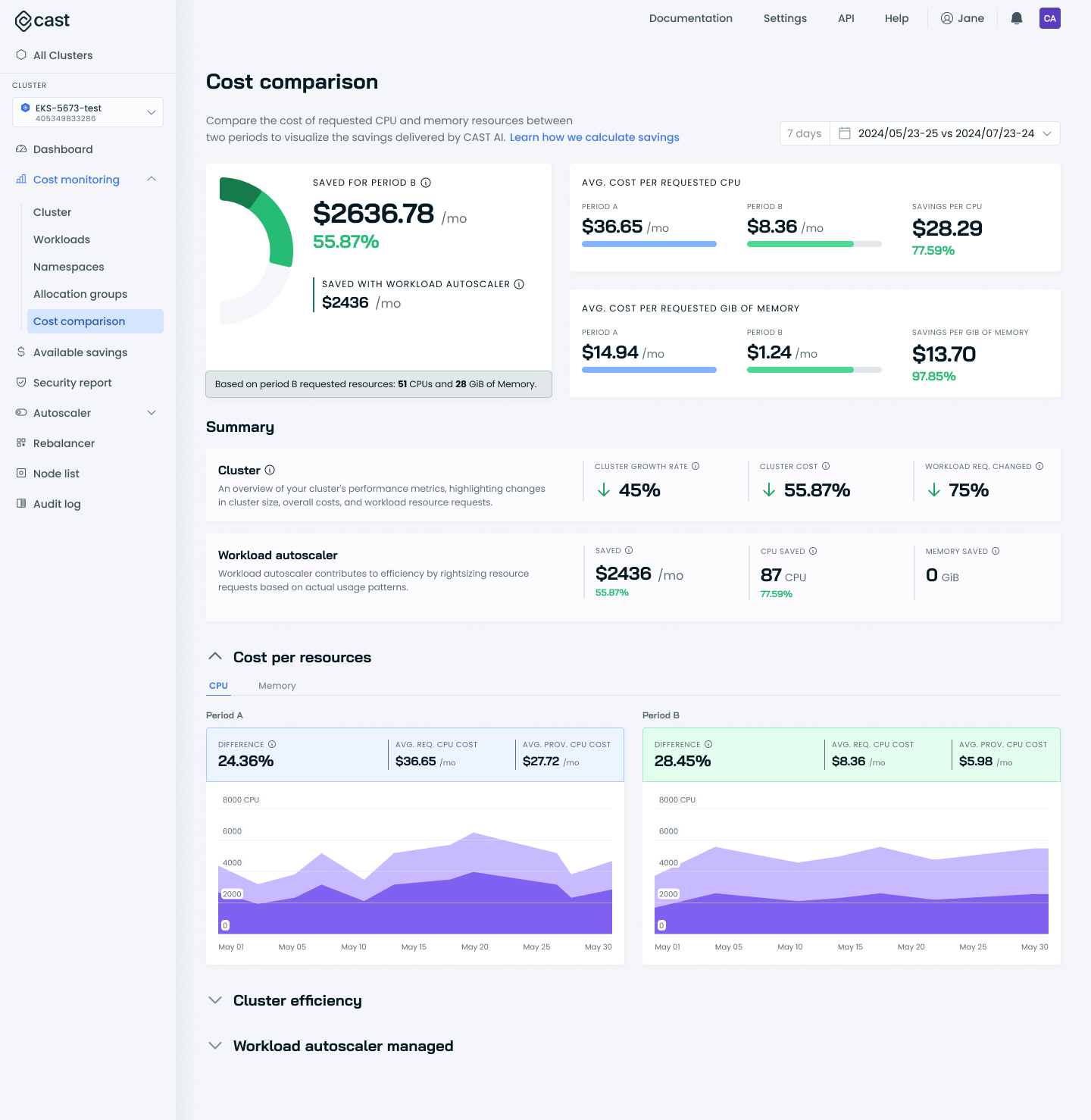
Cast AI replaces the Kubernetes Cluster Autoscaler entirely, so its own engine provisions nodes, selects instance types, and manages the fallback to spot instances (the discounted capacity a cloud provider can reclaim at short notice). The savings are real, but so is the dependency. After 12 months in production, removing Cast AI means rearchitecting node provisioning, not reverting a config file. That is vendor lock-in in the practical sense.
There is a partial middle path in Cast AI for Karpenter, available on EKS, which layers optimization on top of Karpenter without replacing it. It avoids the full-replacement model, but switching to the complete Cast AI Autoscaler later requires a full cluster re-onboard, and running both modes at once is not supported. An off-ramp exists, but it narrows the moment you commit to the full product.
There is a partial middle path in Cast AI for Karpenter, available on EKS, which layers optimization on top of Karpenter without replacing it. It avoids the full-replacement model, but switching to the complete Cast AI Autoscaler later requires a full cluster re-onboard, and running both modes at once is not supported. An off-ramp exists, but it narrows the moment you commit to the full product.
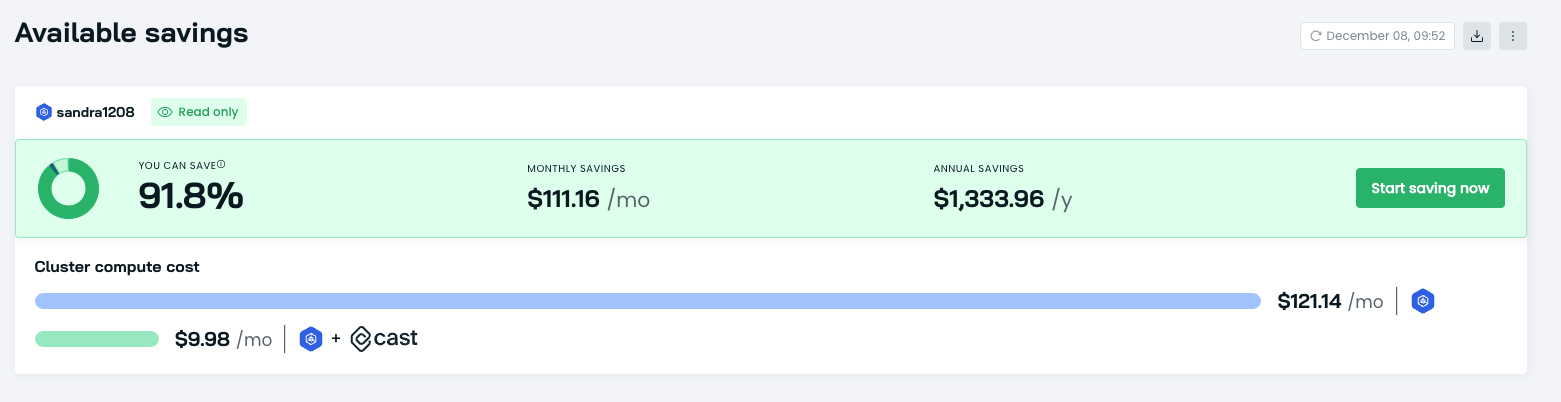
Kubex complements the autoscalers you already know and trust
Kubex works alongside the Horizontal Pod Autoscaler (HPA, which scales replica counts), KEDA (its event-driven counterpart with scale-to-zero support), and Karpenter without replacing any of them. It rightsizes the underlying pod template, allowing pod and node autoscalers to scale efficiently and without waste. Platform teams keep full ownership of the provisioning layer, which matters in environments with ticket-gated ITIL change management, multi-team cluster governance, or contracts that require infrastructure auditability.
The consequence shows up at exit time. Removing Kubex means turning off recommendations, not rebuilding how nodes get provisioned. An application-level cost remains because Kubex tunes live workload requests, limits, and HPA targets over months, and turning it off reverts your workloads to their unoptimized state. Node-level lock-in is gone, but teams should plan to hand resource governance back to native tools like the Vertical Pod Autoscaler (VPA) or manual profiles to avoid drift. Enterprise procurement reviews still tend to identify autoscaler lock-in as the primary risk for regulated accounts moving from proof of concept to production.
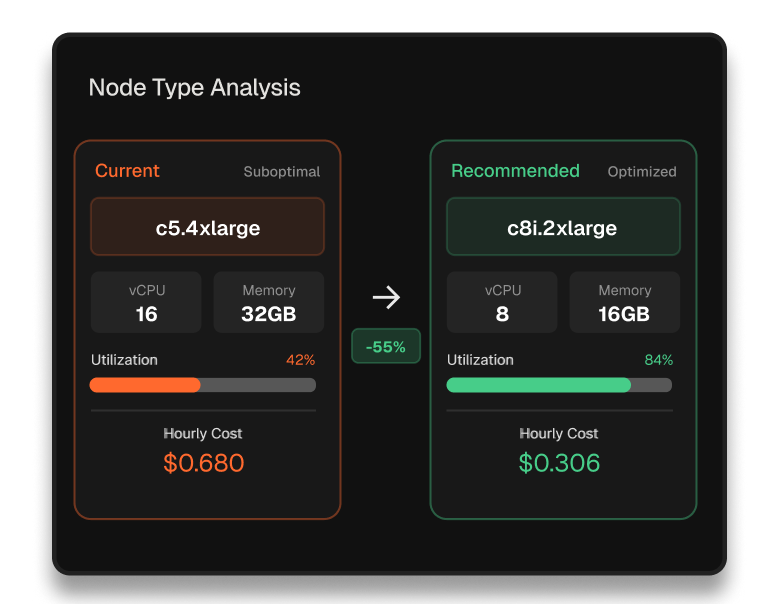
Key insight: Cast AI’s replacement model buys deeper automation at the cost of a hard exit, while Kubex’s advisory model gives up some automation depth and keeps the provisioning layer yours. The right trade depends on how much you value being able to walk away.
GPU and AI workload selection
GPU spend raises two separate questions: where a committed workload can run most cheaply, and which GPU type fits the workload in the first place. Each tool answers one of them well.
Cast AI spreads workloads across regions
Cast AI’s OMNI Compute answers the placement question by providing GPU capacity across 125 regions with spot GPU management, automated fallback, time-slicing (sharing one GPU across several workloads), and utilization monitoring. For a team that has already chosen its hardware and needs to maximize utilization across regions, that case is directly covered. The GPU type is treated as fixed, and the job is to run it cheaply wherever capacity exists.
Cast AI also offers AI Enabler, an OpenAI-compatible LLM API that supports self-hosted model deployment on connected clusters. It routes each request to the lowest-cost model that still meets the SLA, evaluating the payload before it picks an endpoint. That is cost-aware selection across models and providers, not selection of the GPU type a workload should run on. The GPU hardware decision is a separate question, and the one the Catalog Map answers.
Kubex opens the hardware decision
Kubex’s Catalog Map answers the other question: Which GPU type should this workload use? It compares available options in a single pane, so MIG fractions of an A100 (partitions of NVIDIA’s data-center training card), the cheaper inference-focused L4, the top-end B200, and cross-provider choices like the mid-range Azure A10 sit side by side, each scored by technical fit and policy compliance. A team compares before committing rather than finding the mismatch on the invoice.
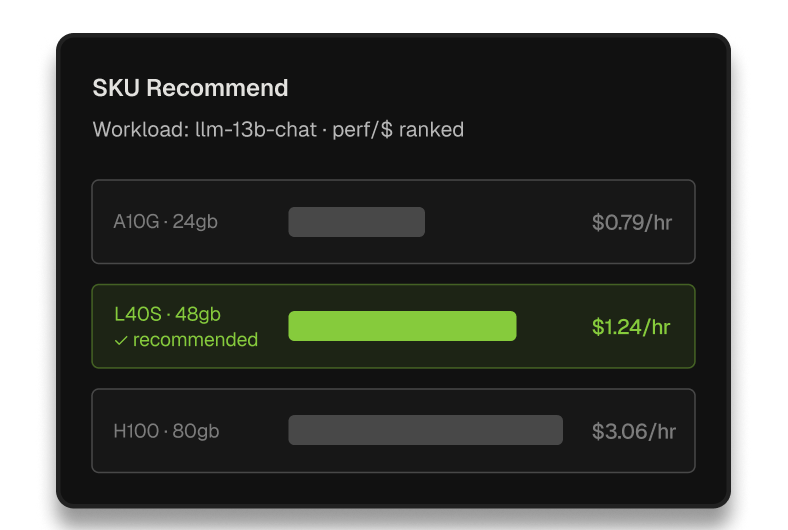
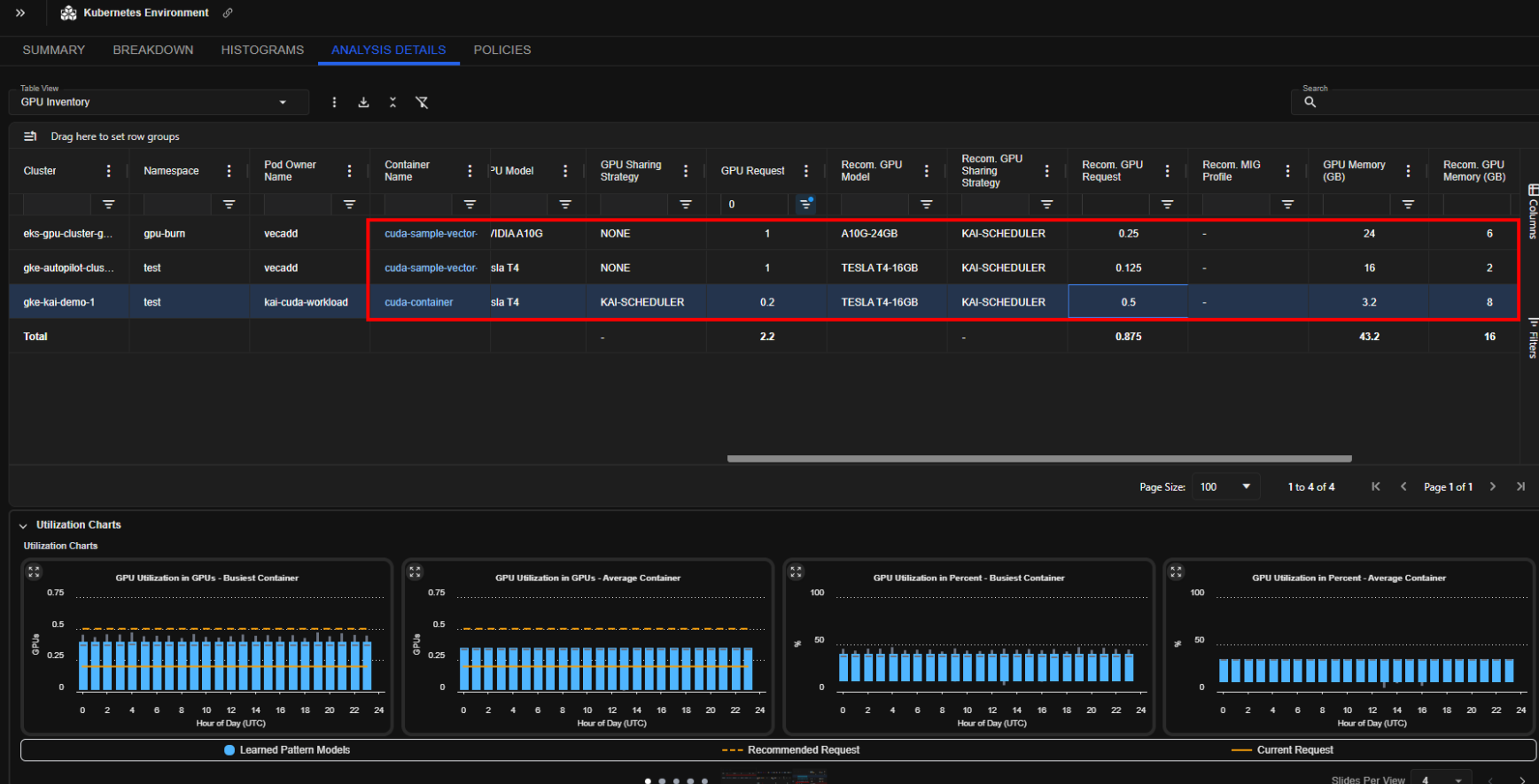
The trade-off is about where the savings live. An LLM running at low utilization on an A100 may belong on a cheaper card, and only a tool that compares types will say so. For teams with hardware already committed, OMNI Compute is the relevant capability, while for teams where GPU selection is still open, the Catalog Map is a richer decision surface that goes past cost-per-region.
Key insight: Both tools cut GPU waste, but Cast AI optimizes where committed hardware runs, while Kubex tells you when a different GPU would have been the better buy. If the hardware choice is still open, that second surface is where the larger savings sit.
Agentic interface and operational adaptability
Both products automate routine optimization and add an AI layer. They differ in how they handle work that doesn’t fit a script.
Cast AI runs prebuilt runbooks
Cast AI’s Application Performance Automation (APA) layer ships four runbooks that connect the optimization engine to a code repository through pull requests. The most useful one syncs workload autoscaler recommendations back into deployment manifests, narrowing the gap between what runs in production and what lives in source control. For a team already on GitOps, the practice where every configuration change flows through a Git repository, this is a concrete, repeatable workflow with version-controlled output.
The runbooks handle anticipated scenarios well, and they are fast and predictable for the cases they were written for. A scenario nobody wrote a runbook for is, by definition, out of scope until someone builds one.
Kubex covers the routine and the edge cases
Kubex includes a conversational AI agent and an MCP server—an interface built on the Model Context Protocol that lets external AI tools query the platform’s data. Platform engineers ask about cluster optimization in plain language, from routine sizing questions to situations that fall outside a static ML model. JVM-heavy applications, multi-tenant clusters with conflicting resource policies, and non-standard traffic patterns are the kinds of cases that do not map cleanly to a fixed rule.
The MCP server is the load-bearing component because it makes the optimization layer callable from outside the Kubex UI, enabling the data to feed the agent pipelines that the platform team already runs. Pre-built runbooks cover the expected path quickly, while an agent covers the novel case without waiting for a new runbook to be written first.
Key insight: The choice tracks how varied your workloads are: predictable patterns favor Cast AI’s runbooks, while a mix of unusual workloads favors an agent that handles cases nobody scripted in advance.
Autonomous node execution and stateful workload handling
This is where Cast AI’s depth is clearest and where Kubex solves a different problem rather than a smaller version of the same one: acting on nodes after demand arrives versus preparing them before it does.
Cast AI executes directly
Cast AI adds and removes nodes, selects instance types, and manages spot fallback without per-action operator approval. Container Live Migration, confirmed on GKE as of May 2026, extends this into stateful workloads, the ones with attached data that normally cannot move without an outage. Pods move between nodes without downtime, which removes the main risk of aggressive node consolidation for databases and stateful services. For teams that want maximum automation depth on stateless workloads, the execution model gets to outcomes faster at the node layer.
Kubex prepares before the spike
Kubex improves the accuracy of container resource requests, enabling Karpenter and the Cluster Autoscaler to make better scale-down decisions. The Node Pre-Warmer adds ML-based predictive pre-scaling for workloads with predictable traffic, such as batch jobs, AI training schedules, and nightly processing windows.
The two address different failure modes: Cast AI optimizes the node layer reactively and deeply, while Kubex targets scale events that require capacity to be ready before traffic arrives. For workloads with predictable traffic patterns, reactive scaling consistently lands too late, and pre-warming closes the cold-start gap.
Key insight: Cast AI suits teams that want the deepest automation on stateless workloads, with live migration covering the stateful case. Kubex suits teams whose peaks follow a cycle that reactive scaling cannot anticipate.
Change governance and audit workflows
Both tools serve compliance-sensitive environments, and both hold the certifications enterprise buyers ask for first. They record change through different systems, though, and the right one depends on where your team keeps its system of record.
Cast AI records through Git
Cast AI holds ISO 27001 and SOC 2 Type II, the two security audit certifications procurement teams usually request. Its audit log has a fixed 90-day retention window, with an open-source exporter for routing records to longer-term storage. The APA runbooks generate GitHub pull requests to update manifests, so changes stay version-controlled and traceable through the GitOps pipeline. For a team that treats GitHub as the system of record, that output drops straight into the existing review flow.
However, this can be a two-edged sword. For large environments or those with frequent change, GitOps integration can put app owners in “PR hell” as they have to approve a stream of Pull Requests for every minor change to a pod’s resource requests and limits.
Kubex records through ITSM
Kubex holds SOC 2 Type II. Changes are automated through in-place resizing and a Mutating Admission Webhook, meaning changes can be implemented quickly and without human intervention, either with or without Git repo write-back. This automation is highly configurable, meaning that only the workloads you want are optimized, according to your business rules.
Furthermore, its integrations with ServiceNow and Jira, the ticket-based change systems most operations teams run, support human-in-the-loop optimization using your existing ITSM workflows.. Compatibility with ArgoCD and Flux, the two main continuous deployment tools, prevents controllers from fighting over resource sizing.
The split is about the approval system of record, because a pull request and a Jira change ticket serve different governance models. Teams running GitOps-first with GitHub as the source of truth benefit from Cast AI’s PR-based output, while teams where platform and operations use ServiceNow or Jira as the approval gate benefit from Kubex’s ITSM path.
Key insight: Both tools produce a clean audit trail, so match the tool to where approvals already live: GitHub points to Cast AI, while ServiceNow or Jira points to Kubex.
Pricing structure and total cost of ownership
The two vendors disclose their rates in opposite ways.
Cast AI prices behind a sales call
Cast AI does not publish pricing, and its pricing page requires a sales conversation with no public tiers or rates. Reviews on G2 and AWS Marketplace point to a per-vCPU model, billed on each virtual CPU the platform manages, though the exact rate is not publicly confirmed. A per-vCPU model scales with compute consumption, which produces a compounding effect: as savings grow and the optimization engine runs on more compute, the tool’s own cost grows alongside it. That makes multi-year TCO harder to model before signing.
Kubex publishes its pricing model
In contrast to Cast AI, Kubex publishes a per-vCPU rate on its pricing page. That is a concrete difference a procurement team can act on: one number is public and can be modeled up front, the other requires a sales quote before terms are signed.
The procurement context decides how much this matters. In a short proof of concept, a usage-based model is easy to justify because the cost tracks directly to savings from day one. For enterprise procurement with legal review, the difference between a published rate and pricing that requires a sales quote is worth raising before commercial terms are finalized.
Key insight: A published rate can be modeled over a multi-year contract, while pricing that is not public cannot be, at least not until a quote arrives. Bring up the difference early, before commercial terms close.
Which platform fits your environment?
Neither tool is the right answer for every cluster because the fit follows the shape of the environment rather than a feature count.
Choose Cast AI if you want the deepest automation with the least hand-holding and if the replacement of your autoscaler is an acceptable price for it. It fits teams running GitOps-first with GitHub as the system of record, teams with committed GPU hardware that need utilization spread across regions, and stateless-heavy estates where live migration covers the stateful exceptions.
Choose Kubex if autoscaler lock-in is a risk your procurement review will not accept, and keeping the provisioning layer yours is non-negotiable. It is the stronger fit when spikes follow a known cycle, when the GPU type decision is still open, and the Catalog Map’s comparison beats placement alone. It is also a great choice when optimization data needs to feed external agent pipelines through MCP, or when ServiceNow or Jira is the approval system of record.
The autoscaler question is the one to settle first, because it decides most of the rest. A hard requirement to keep provisioning under your own control points to Kubex before any other criterion is weighed. Absent that, a stateless estate that values automation depth over exit flexibility tilts toward Cast AI.
Conclusion
The decision rarely comes down to a single missing feature; it comes down to how much control you are willing to hand over and how hard it would be to take it back. Cast AI replaces your autoscaler, automates deeply, and gets to savings fast, with the lock-in that follows from owning the provisioning layer. Kubex works next to your autoscaler, predicts load before it arrives, and stays removable at the provisioning layer, with the caveat that its tuned workload thresholds freeze at exit and need handing back to native tools.
The cleanest way to settle the question is to start from the constraint that does not move. If it’s important that walking away from the tool in two years be inexpensive, the evaluation will be quick. If it is not, run both against the hardest scenario in your environment—a known-cycle batch window or a regulated change rollout—and let the result decide rather than the datasheets.
Table of Contents

Try us
Experience automated K8s, GPU & AI workload resource optimization in action.
Get Started for Free


Get started with Kubex

Enter your email
Error: Contact form not found.
By signing up, you consent to the Terms of Service and Privacy Policy.
Need help? Contact Support